
RoPay for WHMCS
The Libra Internet Bank RoPay payment gateway for WHMCS. Romanian customers pay an invoice by scanning a QR code in their banking app; RoPay confirms the payment server-to-server and WHMCS marks the invoice paid automatically. Full and partial refunds, a tabbed admin console and a one-click Test/Production switch included.
See the module in action
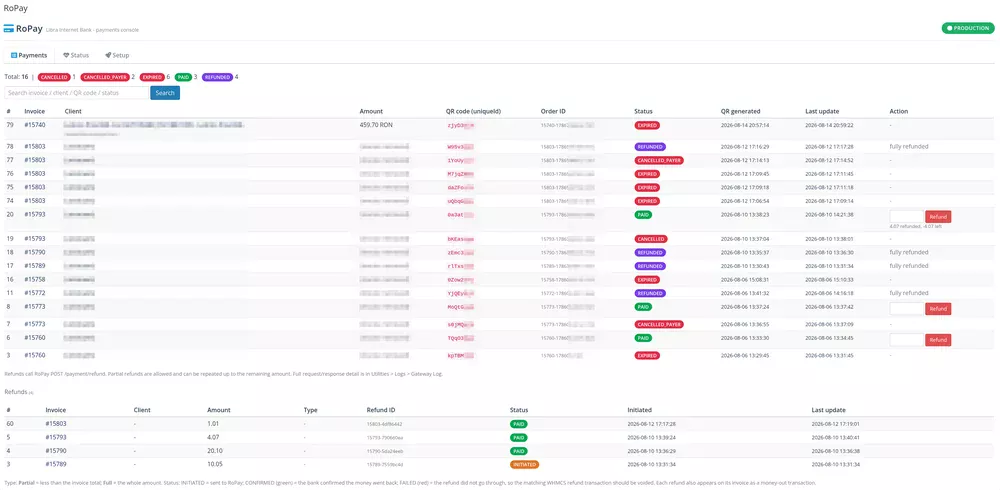
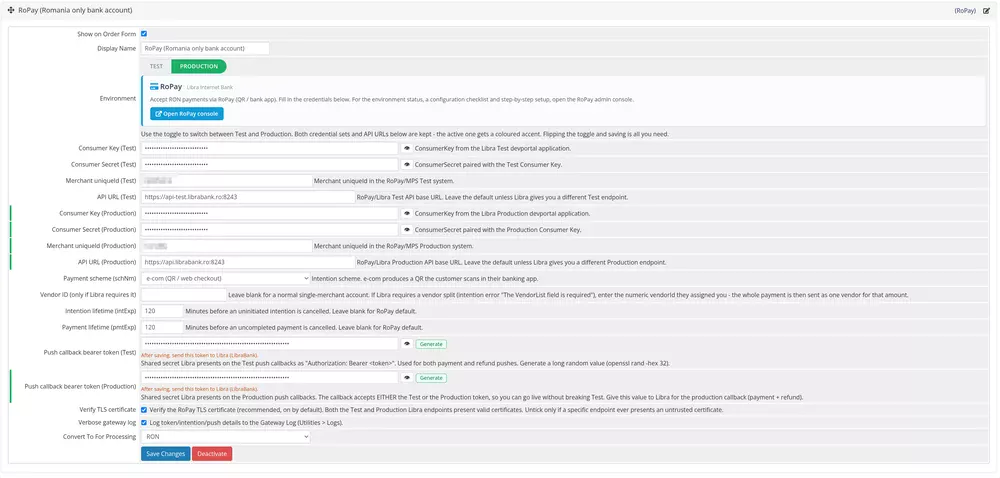
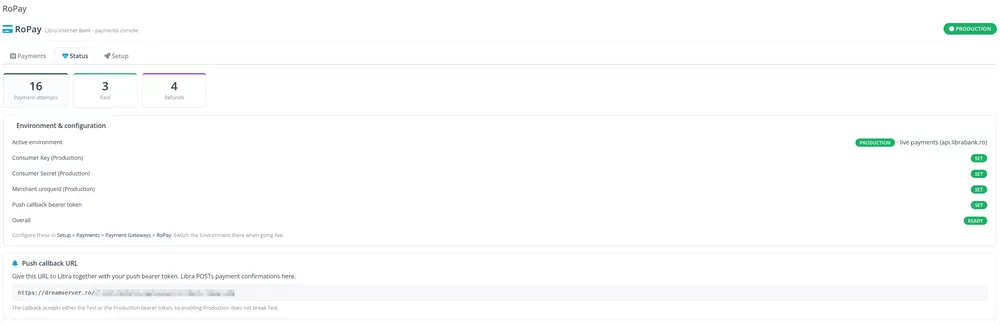
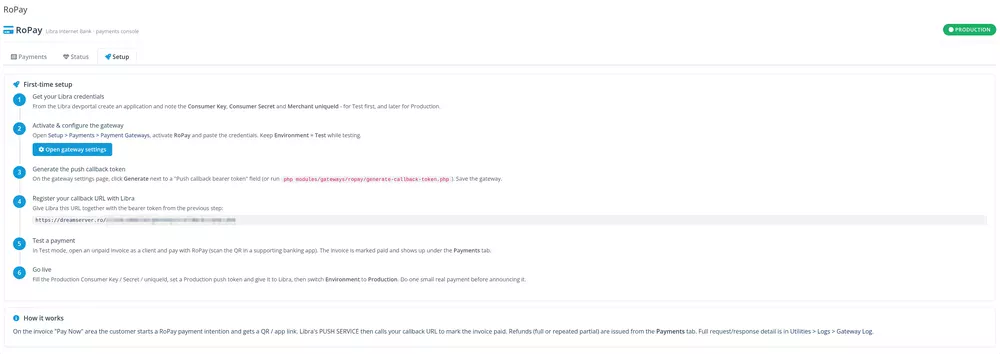
Real screenshots from a live RoPay install: the payments console with one-click refunds, the gateway configuration, the status checklist and the guided setup.
From invoice to paid, without touching a card
A redirect + asynchronous push flow. No card data ever touches your WHMCS, and the charged amount is always recomputed server-side from the invoice.
What’s inside
A complete RoPay integration, not just a redirect. Everything a store needs to accept, confirm and reconcile RON payments through Libra Internet Bank.
QR / e-com checkout
The customer gets a QR code plus a banking-app deep link. No card data touches your server. Every click produces a fresh, single-use intention so a dead QR is never re-shown.
Server-to-server confirmation
Libra’s PUSH service calls a bearer-authenticated callback to mark the invoice paid, with a server-side status re-check as defense in depth, so a genuine payment is never lost or double-counted.
Live status on the pay page
The payment page polls its own endpoint and reacts in real time: it drops a scanned (now single-use) QR into a “processing” state, and offers a fresh QR after an expiry or a decline.
RON-only, done right
Non-RON invoices get a professional bilingual notice inviting the customer to ask for a RON re-issue, instead of a bare error. The amount and currency are recomputed from the database, never from the form.
Security hardened
Owner-only payment endpoints (no IDOR), constant-time callback authentication, server-computed amounts, TLS verification on by default and https-only API endpoints. Built for a live billing system.
Test / Production switch
Both credential sets and API URLs live side by side. A single toggle flips the gateway between the Libra test and production endpoints, with the active set clearly highlighted.
Full & repeated partial refunds
Refund the whole amount or issue repeated partial refunds up to the remaining balance, from the invoice or from the RoPay console. The remaining refundable amount is enforced server-side.
Async reconciliation
A refund call only “initiates”; the refund push carries the final outcome. Confirmed refunds are logged, and a failed refund is flagged loudly so the matching WHMCS transaction can be voided.
Recorded on the invoice
Each refund appears on the invoice as a standard WHMCS money-out transaction (no separate refund invoice), and in a Refunds table in the console with Partial / Full labels and a status badge.
Payments / Status / Setup tabs
A tabbed admin console: every payment attempt with client, invoice, amount, QR id and status; a live configuration checklist with a Production / Test badge; and a step-by-step setup guide.
Callback token generator
Generate the push callback bearer token with one click, right next to the field on the gateway settings page (or from a bundled CLI helper), then hand it to Libra with your callback URL.
Editable endpoints
Consumer Key / Secret, merchant uniqueId and the API URL are configurable per environment. Verbose gateway logging can be flipped on for debugging and back off in production.
- WHMCS
8.8+and9.x· uses only stable gateway and callback APIs, unchanged between WHMCS 8 and 9- PHP
8.1,8.2,8.3and8.4· one ionCube build per PHP version; the 8.4 build also runs on PHP 8.5- Bank / scheme
- Libra Internet Bank RoPay · RoPay API v1.1 · OAuth2 client-credentials · e-com QR / P2B
- Currency
RONonly, by design (Romanian bank accounts)- Refunds
- Full and repeated partial refunds · reconciled via the refund push
- Database tables
mod_ropay_intentions,mod_ropay_refunds· created and migrated automatically- License
- Annual, issued from our WHMCS · one active install per license, with an offline grace period
From upload to live in four steps
Drop the module into your WHMCS root, configure the gateway and register your callback with Libra. The RoPay console’s Setup tab walks you through it with a live checklist.
modules/ into your WHMCS root. Requires the ionCube Loader (already present on every WHMCS server).Changelog
Reverse-chronological. The module runs in our own WHMCS billing against the live Libra RoPay API before each release ships.
v1.1.12 August 2026 Latest
- New RoPay now shows with its logo, tagline and feature list in the WHMCS “Apps & Integrations › Browse › Payments” browser, next to the other providers.
- Fix Resolved an error that could appear when activating the gateway.
- Improvement Clearer setup before activation: the configuration page shows just the License Key field until a valid license is in place, then reveals the full settings.
- Improvement Now shipped as one build per PHP version (8.1, 8.2, 8.3, 8.4); the 8.4 build also runs on PHP 8.5. Reliability and performance polish throughout.
v1.1.0 August 2026
- New Test / Production toggle switch on the gateway settings page (replaces the dropdown), with a coloured accent on the active credential set.
- New Editable “API URL (Test)” / “API URL (Production)” fields, defaulting to the Libra endpoints.
- New One-click Generate button for the push callback bearer token, plus a bundled CLI helper.
- Improvement Admin console redesigned into Payments / Status / Setup tabs: environment badge, configuration checklist, callback URL and a first-time setup guide.
- Hardening The editable API URL is https-only, so consumer credentials can never leave in clear text.
v1.0.0 July 2026
- New First release: RoPay gateway with OAuth2 client-credentials, e-com QR payment intention, status polling and a bearer-authenticated PUSH callback.
- New Full and repeated partial refunds, reconciled with the refund push and recorded on the invoice.
- New Admin overview of every payment attempt and refund, with search and pagination.
- Improvement Live state machine on the pay page: CREATED → IN_PROGRESS → PAID, with retry on expiry or decline.
Will it run on your install?
A regular WHMCS payment gateway plus a small admin addon. Drop it into modules/gateways/ and modules/addons/, activate from the admin, and you’re done. No external services, no message queue, no separate database.
- WHMCS
- WHMCS 8.8+ and 9.x · uses only stable gateway / callback APIs
- PHP
- 8.1, 8.2, 8.3 and 8.4 · one build per PHP version (the 8.4 build also runs on PHP 8.5) · ionCube Loader required, already present on every WHMCS server
- Libra account
- A signed contract with Libra Internet Bank (LibraBank) and the RoPay service activated on your merchant account · Consumer Key / Secret + merchant uniqueId from the Libra devportal
- Outbound HTTPS
- Your server must reach the RoPay API over HTTPS (
*.librabank.ro:8243). Test first, then production - Currency
- RON · Romanian bank accounts only
- Database
- MySQL / MariaDB via WHMCS · module creates and migrates its own tables
Downloads, updates & your license key – in your client area
Buy the license once and everything lives in your DreamServer client area. Open your RoPay service and a Downloads & Documentation panel gives you every released version, the changelog, the installation guide and your license key – for as long as your license stays active. New versions appear there automatically; no emails to chase.
Libra Internet Bank RoPay payment gatewayWHMCS 8.8+ and 9 · PHP 8.1 / 8.2 / 8.3 / 8.4
ROPAY-7QF2K-9M4XA-BZ13R-8HD6PCopyYour download access stays available for as long as your license is active. Need help? Open a ticket from your client area.
Every version, always
Download the current build for your PHP version, straight from your service page. Secure, per-account, never a public link.
Free updates while active
Every new version is included for the whole license term. It shows up in your client area the moment we publish it – with its changelog.
License-locked access
Downloads are tied to your active license. Renew and you keep full access; the same key activates the module inside WHMCS.
One annual license
or 50 RON / year · $12 / year
- ✓ Full gateway + admin console
- ✓ Full & partial refunds
- ✓ Free updates for the license term
- ✓ WHMCS 8 & 9, PHP 8.1 – 8.3
- ✓ Email support
Requires a LibraBank contract. RoPay works through Libra Internet Bank - you need a signed contract with LibraBank and the RoPay service activated on your merchant account.