Bare Metal Performance

Bare Metal Blade Servers

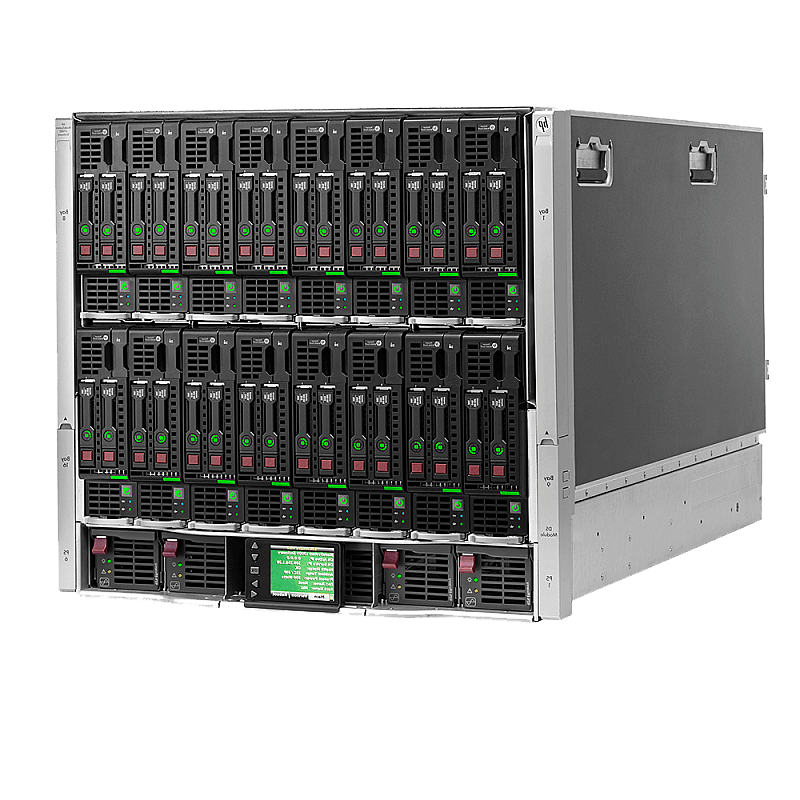
Deploy enterprise-grade bare metal infrastructure powered by HP ProLiant BladeSystem servers. Each configuration starts with a minimum of 192 GB ECC RAM and dual Intel Xeon processors, delivering the performance, stability, and reliability required for demanding workloads.

Our blade architecture provides a compact, high-density solution ideal for virtualization clusters, private cloud environments, high-availability platforms, and mission-critical applications. The modular HP ProLiant blade platform allows rapid scaling, efficient hardware upgrades, and seamless server replacement, without major infrastructure investments.
RIPE NCC LIR Member Free DSIX Peering AS57050 Founded 2009
Request a Quote View Pricing
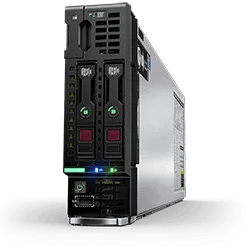
HP ProLiant Blade Server
Network Architecture

How Your Blade Connects to the World

The diagram below shows the complete network path from your blade server through the HP Virtual Connect fabric, across redundant Cisco Nexus switches, to the internet and DSIX peering exchange.
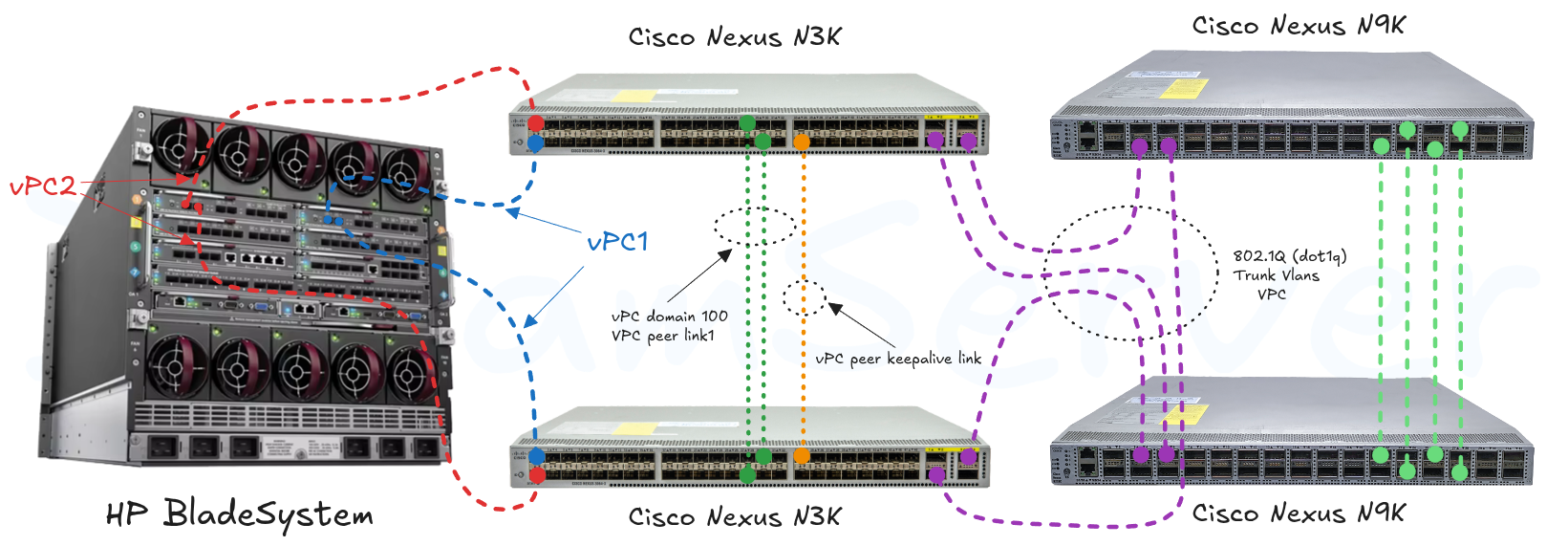
HP BladeSystem with Virtual Connect and Cisco Nexus vPC Architecture

High-Availability Blade Server with HP Virtual Connect and Cisco Nexus vPC

Blade Server Plans

Choose from our HP ProLiant BladeSystem configurations, each with dual Intel Xeon processors, ECC RAM, hardware RAID, and dual-port Cisco Nexus vPC networking. All plans include a 128 GB OS SSD, 25 TB monthly traffic, dedicated IPv4 and IPv6 addresses, iLO remote management via secure VPN, and a free peering port to DSIX Internet Exchange.
🎉 DiscountThis blade server is available at a reduced price. Enterprise-grade performance at an unbeatable value.
HP BL460c G6

HP BL460c G6

Dual XEON L5640
24 Cores @ 2.80 GHz
192 GB ECC RAM
Up to 2x SAS or SATA
Dual 1 or 10 Gbit/s
25 TB/mo
20 IPv4 | 20 IPv6
RAID 1 or 0
DreamServer, Bucharest, Romania
🎉 DiscountThis blade server is available at a 50% discount. Take advantage of this limited-time offer for enterprise-grade blade performance at half the price.
HP BL460c G7

HP BL460c G7

Dual XEON L5640
24 Cores @ 2.80 GHz
192 GB ECC RAM
Up to 2x SAS or SATA
Dual 1 or 10 Gbit/s
25 TB/mo
20 IPv4 | 20 IPv6
RAID 1 or 0
DreamServer, Bucharest, Romania
⚡ LimitedOnly a few units of this blade server remain in stock. Availability is limited and may sell out soon. 🎉 DiscountThis blade server is available at a reduced price with the highest RAM capacity in our blade lineup.
HP BL490c G7

HP BL490c G7

Dual XEON E5645
24 Cores @ 2.67 GHz
288 GB ECC RAM
Up to 2x SAS or SATA
Dual 1 or 10 Gbit/s
25 TB/mo
20 IPv4 | 20 IPv6
RAID 1 or 0
DreamServer, Bucharest, Romania
Included with Every Blade Server

Free Port to DSIX Internet Exchange, 1 Gbps or 10 Gbps

Every blade server ships with dual 10 Gbps dedicated ports through the HP Virtual Connect fabric. Connect your BladeSystem to the DSIX Internet Exchange (AS58218) at no additional cost, with either a 1 Gbps or 10 Gbps peering port included. Peer directly with Romanian ISPs, CDNs, hosting providers, and content networks for sub-millisecond latency and reduced transit costs.

Combined with up to 288 GB ECC RAM per blade, our BladeSystem platform is ideal for building peering-enabled virtualization clusters, content delivery nodes, and high-performance hosting infrastructure.

Explore DSIX & Members View Enterprise Servers

BladeSystem Technology

HP ProLiant BladeSystem with HPE Virtual Connect and Cisco Nexus vPC delivers enterprise-grade performance, redundancy, and simplicity in a single modular enclosure.

Enterprise-Grade Blade Server Connectivity

Our blade server solutions integrate HP BladeSystem enclosures equipped with dual Virtual Connect Flex-10 modules directly connected to Cisco Nexus data center switches using virtual PortChannel (vPC) technology. This architecture delivers resilient, high-performance network connectivity designed to maximise uptime, aggregate throughput, and enable seamless scaling for the most demanding enterprise workloads.

Each blade in the enclosure benefits from hardware-level network virtualisation through Virtual Connect. This allows network profiles (MAC, VLAN, bandwidth limits) to be assigned independently of the physical server, enabling rapid blade replacement, migration, and provisioning without reconfiguring upstream switches.

DreamServer DataCenter

Our premier hosting facility in Bucharest, Romania. Every blade server is housed in our own secure, climate-controlled datacenter with redundant power, high-speed fiber uplinks, and advanced cooling. From enterprise applications to high-density virtualization, DreamServer delivers the reliability your business demands.

Own Datacenter

Hosted in our DreamServer Datacenter in Bucharest with full physical control, enterprise-grade security, redundant UPS with generator backup, and 99.9% SLA-guaranteed uptime.

High Performance

Powered by HP ProLiant BladeSystem hardware with enterprise ECC RAM and SSD storage. Multi-carrier fiber connectivity, Cisco Nexus switching fabric, and sub-millisecond latency for demanding applications.

24/7 Expert Support

Professional engineering team available around the clock via email, phone, and support tickets. Proactive monitoring, scheduled maintenance, and hands-on troubleshooting to keep your blades running at peak efficiency.

Included on All Dedicated Servers

RTBH DDoS Mitigation with sFlow Telemetry

We operate Remotely Triggered Black Hole (RTBH) filtering on our BGP uplinks, continuously monitored via sFlow telemetry on our edge routers. When traffic to a destination IP spikes above baseline, our sFlow collector detects the anomaly in real time and triggers a blackhole route over iBGP. The blackhole community is automatically announced to our upstream Transit Providers, so the attack traffic is dropped at their network edge before it ever reaches our network, while the rest of your infrastructure stays online.

Your blade fleet and virtualization clusters, running Proxmox VE, VMware ESXi, or Hyper-V with dozens of VMs per node, continue serving traffic on every healthy IP while the attacked one is blackholed. The vPC fabric keeps surviving workloads at line-rate throughput. You can announce a blackhole community yourself (if you operate BGP with us) or simply ask our NOC to trigger it. RTBH is effective against volumetric L3/L4 floods (UDP, SYN, amplification). Layer 7 application-layer attacks fall outside the scope of RTBH and require application-level defenses such as a WAF, rate limiting, or caching that you implement at your own application tier.

Compromised Hosts 1 Attack launched Internet user192.0.2.5 Transit Provider Upstream ISP sp-router DreamServer AS57050 ce-router Your Blade sFlow Telemetry Collector real-time anomaly detection attack dropped legit traffic sFlow 2 iBGP 3 BGP blackhole announcement (eBGP) automatically propagated to upstream 4
Attack traffic sFlow telemetry BGP blackhole announcement
Recommended Add-on

Pair Your Blade with Proxmox Backup Server

Planning to install Proxmox VE on your blade? We strongly recommend bundling it with our Proxmox Backup Server service. The two products are engineered to work together: PBS plugs in as a native storage target on the Proxmox VE node (Proxmox VE 8 or newer recommended), uses QEMU dirty bitmaps for fast incremental VM and container backups, and unlocks Live-restore so a guest can boot while its data is still streaming back from the backup store. Trust between the blade and the backup server is anchored by a certificate fingerprint pinned at storage-add time.

Not running Proxmox VE? The recommendation still holds. Proxmox Backup is a client-server solution where many unrelated hosts can share one backup server. The lightweight client runs on most modern Linux distributions, so you can back up files, directories, and entire raw disks from any blade or VM into a centralised, deduplicated, encrypted store. Encryption happens client-side, before any byte leaves the blade, so the server only ever sees ciphertext.

Incremental & Deduplication
BLADE SOURCE HOST proxmox-backup-client vm-100-disk-0.qcow2 /etc, /var, /home /dev/sdb (raw disk) Encrypt → Compress → Chunk AES-256-GCM ZSTD compression SHA-256 chunk hash Backup #1 · FULL · many chunks Backup #2 · INCREMENTAL · only changed chunks sent Backup #3 · INCREMENTAL · minimal delta TLS 1.3 · AES-256-GCM end-to-end encrypted server stores ciphertext only DEDUP PROXMOX BACKUP SERVER SHA-256 verified chunk store a3f2.. x3 7c91.. x5 b8e4.. d105.. x2 e0a7.. f291.. 22cc.. 9b3a.. 4f88.. 15e2.. duplicate chunks → single stored copy Snapshot manifest (index.json) 320 chunks · 287 unique · 33 deduped
Encrypted, compressed chunks in flight Dedup match (chunk already stored) Single stored copy, N references

Incremental + Deduplication

Periodic backups produce mostly duplicate data. The client sends only changed blocks; the server splits data into fixed or variable sized chunks and collapses identical ones across all hosts and snapshots. A fleet of VMs sharing one OS image stores that OS once.

ZSTD Compression

Zstandard handles several gigabytes per second on modern CPUs while keeping a high compression ratio. Backups stay fast and storage stays small, with no perceptible CPU pressure on the source blade.

End-to-end Encryption

Authenticated AES-256 in Galois/Counter Mode (GCM) runs on the client, before any byte leaves the blade. An optional RSA master key pair safely stores and recovers the backup key, which you can print for offline, disaster-proof storage.

SHA-256 Integrity

Every backup ships with a manifest (index.json) listing every file, size, and SHA-256 checksum. Schedule verification jobs to catch bit rot. The same checksums drive cross-machine deduplication, so identical OS chunks are stored once across your fleet.

Granular Recovery

Why restore everything when you can restore one file? Browse the snapshot catalog, pull individual files or directories from a VM image, drop into an interactive recovery shell, or Live-restore a guest that boots while data is still streaming back.

Learn About Proxmox Backup Order Backup Storage

Tight integration with Proxmox VE 8 or newer, certificate-fingerprint pinned, deployable in minutes.

Frequently Asked Questions

Everything you need to know about our blade server solutions.

What is a blade server?
A blade server is a compact, modular server that fits into a shared enclosure (chassis) along with other blades. Unlike traditional rack servers, blades share power, cooling, networking, and management infrastructure, resulting in higher density, lower cabling complexity, and simplified administration.
How much RAM do DreamServer blade servers have?
Our blade servers come with 192 GB to 288 GB of ECC registered RAM depending on the model. The HP BL460c G6 and G7 ship with 192 GB, while the HP BL490c G7 supports up to 288 GB, ideal for memory-intensive virtualization and database workloads.
What networking is included with blade servers?
Every blade includes dual-port connectivity through HP Virtual Connect Flex-10 modules connected to Cisco Nexus switches via vPC (virtual PortChannel). This provides redundant active-active networking with speeds of 1 Gbps or 10 Gbps per port.
Is DSIX peering included with blade servers?
Yes. Every blade server includes a free port to the DSIX Internet Exchange (AS58218) at no additional cost. You can choose between 1 Gbps or 10 Gbps peering ports to connect directly with Romanian ISPs, CDNs, and content providers.
Can I run virtualization on blade servers?
Absolutely. With 192-288 GB ECC RAM and 24 cores per blade, these servers are purpose-built for running VMware ESXi, Proxmox VE, Microsoft Hyper-V, or KVM. Virtual Connect FlexNIC technology allows partitioning each 10 Gbps port into multiple virtual NICs for isolated VM networking.
What storage options are available?
Each blade supports up to 2 hot-swappable SAS or SATA drives with hardware RAID 0 or RAID 1 through the HP Smart Array controller. All blades ship with a 128 GB OS SSD pre-installed. External NFS/iSCSI storage is available over the 10 Gbps Virtual Connect fabric.
How do I manage my blade server remotely?
Every blade includes HP Integrated Lights-Out (iLO) for full out-of-band management. Access iLO through our secure VPN to power on/off, launch remote console, mount virtual ISO images, and monitor hardware health, even when the OS is unresponsive.
Where are the blade servers located?
All blade servers are hosted in the DreamServer datacenter in Bucharest, Romania, within EU jurisdiction. Our facility features redundant power with UPS and generator backup, advanced cooling, and multi-carrier fiber uplinks with 99.9% SLA-guaranteed uptime.
What is the difference between a blade server and a rack server?
A blade server is a modular compute unit that slots into a shared enclosure (chassis) providing common power, cooling, networking, and management. Rack servers are standalone units with their own power supplies and NICs. Blades offer higher density (more compute per rack unit), simplified cabling, and centralized management through HP Virtual Connect. Rack servers offer more local storage bays and independence from shared infrastructure.
How many blades fit in one HP BladeSystem enclosure?
The HP BladeSystem c7000 enclosure supports up to 16 half-height blades or 8 full-height blades. Each enclosure shares redundant power supplies, cooling fans, and Virtual Connect modules. DreamServer hosts multiple enclosures, allowing you to start with one blade and scale to dozens without infrastructure changes.
Can I mix different blade models in the same enclosure?
Yes. The HP BladeSystem c7000 enclosure supports mixing different blade models (BL460c G6, BL460c G7, BL490c G7) in the same chassis. Each blade operates independently with its own CPU, RAM, and storage, while sharing the enclosure's networking fabric and power infrastructure.
Can I use my blade server for web hosting with cPanel or Plesk?
Absolutely. With 192-288 GB RAM and 24 CPU cores, blade servers are excellent for hosting hundreds of websites. Install cPanel/WHM, Plesk, Hestia, or any other control panel on top of a standard Linux distribution. The dual-port vPC networking ensures your hosted sites benefit from redundant connectivity and free DSIX peering for Romanian traffic.
How do I monitor my blade server health?
Through the iLO management interface (accessible via VPN), you can monitor CPU temperature, fan speeds, power consumption, memory status, and disk health in real time. iLO also sends SNMP traps and email alerts for hardware events. Additionally, our NOC monitors all blade enclosures 24/7 and proactively contacts you if we detect anomalies.
Can I get a private VLAN between multiple blades?
Yes. HP Virtual Connect supports creating isolated network segments (server profiles) that span multiple blades within the same enclosure. We can configure private VLANs for inter-blade communication (e.g., database replication, cluster heartbeats) with no traffic leaving the enclosure. For cross-enclosure VLANs, we route through the Cisco Nexus fabric.
What payment methods do you accept?
We accept credit/debit cards (Visa, Mastercard via euPlatesc), bank transfers (EUR, USD, GBP, RON via Libra Internet Bank), PayPal, and Bitcoin (on-chain and Lightning Network via BTCPay). Invoices are generated monthly in advance. For bank transfers, payment is due within 7 days of invoice date.

Trusted By & Member Of

We are proud members of leading internet infrastructure organizations.

RIPE NCC MANRS PeeringDB RoTLD DSIX SBIX 4IXP LOCIX Euro-IX RIPE NCC MANRS PeeringDB RoTLD DSIX SBIX 4IXP LOCIX Euro-IX