Proxmox Backup Admin for WHMCS
Sell Proxmox Backup Server storage straight from WHMCS. Every order gets its own ZFS-backed datastore with a quota, a PBS user and an API token, created automatically. Your customers add the storage to Proxmox VE in a minute; you run every server from one console with health checks, an audit log and Prometheus metrics.
The admin console, live
Click through the same groups and pages as in version 1.3.1. The data is simulated; nothing here connects to a server.
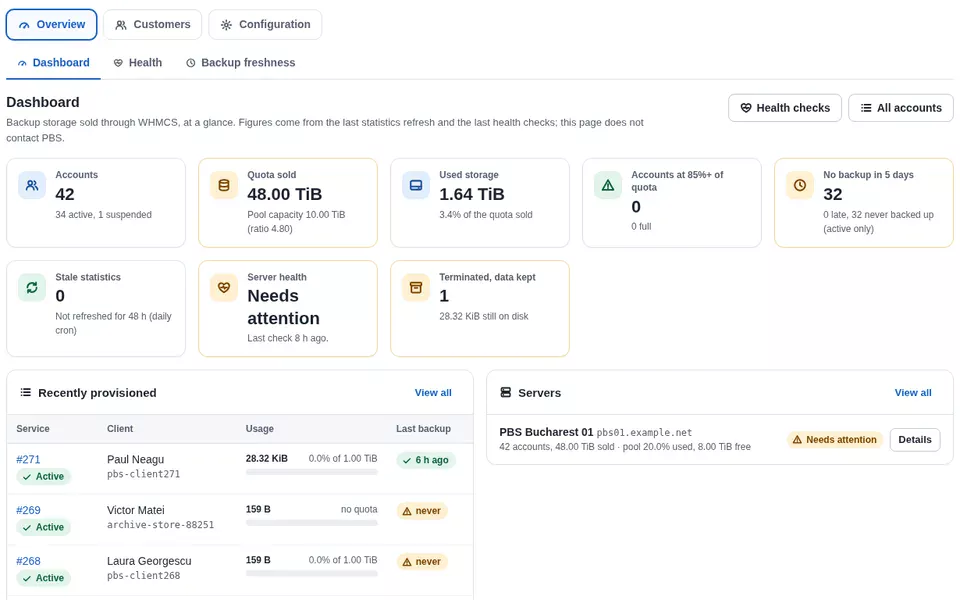
Dashboard
Backup storage sold through WHMCS, at a glance. Figures come from the last statistics refresh and the last health checks; this page does not contact PBS.
| Service | Client | Usage | Last backup |
|---|---|---|---|
| #1042 Active | Andrei Popescupbs-client1042 | 1.62 TiB81% of 2.00 TiB | 3 h ago |
| #1039 Active | Elena Dumitrupbs-client1039 | 912.4 GiB89% of 1.00 TiB | 5 h ago |
| #1031 Active | Radu Constantinpbs-client1031 | 3.71 TiB93% of 4.00 TiB | 1 h ago |
| #1027 Active | Ana Marinescupbs-client1027 | 410.8 GiB20% of 2.00 TiB | 7 days ago |
| #1018 Active | Victor Mateipbs-client1018 | 6.20 TiB62% of 10.00 TiB | 2 h ago |
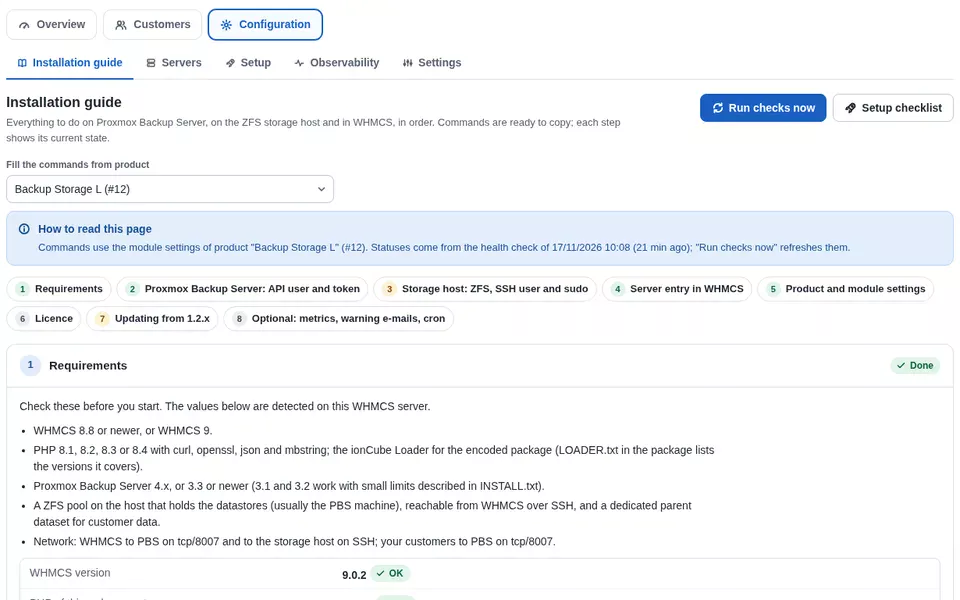
pbs01.example.net OKpbs02.example.net OKInstallation guide
Everything to do on Proxmox Backup Server, on the ZFS storage host and in WHMCS, in order. Commands are ready to copy; each step shows its current state.
Commands use the settings of product "Backup Storage M" (#14).
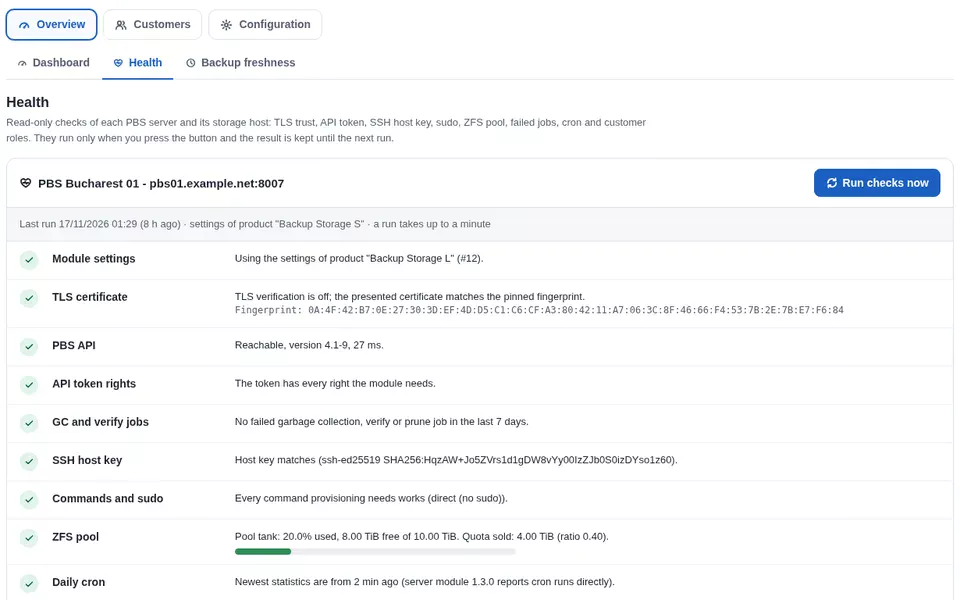
Health
Read-only checks of each PBS server and its storage host: TLS trust, API token, SSH host key, sudo, ZFS pool, failed jobs, cron and customer roles.
proxmox-backup-manager cert info on the PBS host.7C:19:5A:E2:90:4B:D3:61:0F:8A:2C:77:B5:E0:13:9D:46:A8:C1:3E:52:F9:08:6D:BB:24:71:CE:95:3A:E7:10Backup freshness
Active accounts with no backup in the last 5 days, oldest first. The threshold is up to you.
| Service | Client | Datastore | Last backup |
|---|---|---|---|
| #1012 | Laura Georgescucreated 9 days ago | pbs-client1012 | never |
| #1027 | Ana Marinescuana.marinescu@example.com | pbs-client1027 | 7 days ago10/11/2026 02:14 |
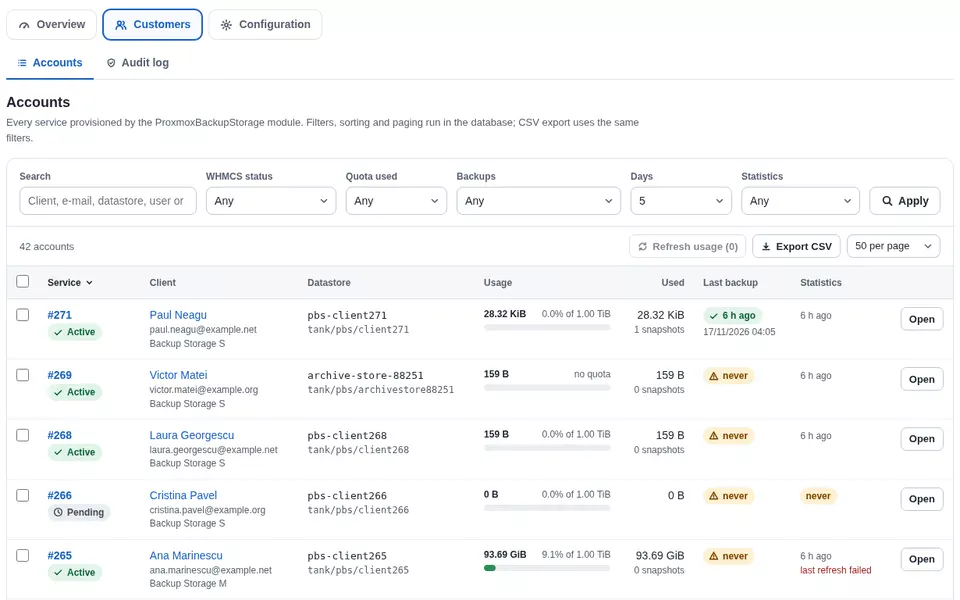
Accounts
Every service provisioned by the module. Filters, sorting and paging run in the database; CSV export uses the same filters.
| Service | Client | Datastore | Usage | Last backup | |
|---|---|---|---|---|---|
| #1042 Active | Andrei Popescuandrei.popescu@example.com | pbs-client1042tank/pbs/client1042 | 1.62 TiB81% of 2.00 TiB | 3 h ago | |
| #1039 Active | Elena Dumitruelena.dumitru@example.net | pbs-client1039tank/pbs/client1039 | 912.4 GiB89% of 1.00 TiB | 5 h ago | |
| #1031 Active | Radu Constantinradu.constantin@example.org | pbs-client1031tank/pbs/client1031 | 3.71 TiB93% of 4.00 TiB | 1 h ago | |
| #1027 Active | Ana Marinescuana.marinescu@example.com | pbs-client1027tank/pbs/client1027 | 410.8 GiB20% of 2.00 TiB | 7 days ago | |
| #1018 Active | Victor Mateivictor.matei@example.net | pbs-client1018tank/pbs/client1018 | 6.20 TiB62% of 10.00 TiB | 2 h ago | |
| #1012 Active | Laura Georgesculaura.georgescu@example.org | pbs-client1012tank/pbs/client1012 | 0 B0% of 1.00 TiB | never | |
| #998 Active | Bogdan Stoicabogdan.stoica@example.com | pbs-client998tank/pbs/client998 | 1.98 TiB99% of 2.00 TiB | 4 h ago | |
| #987 Active | Ioana Stanioana.stan@example.net | pbs-client987tank/pbs/client987 | 2.44 TiB61% of 4.00 TiB | 6 h ago |
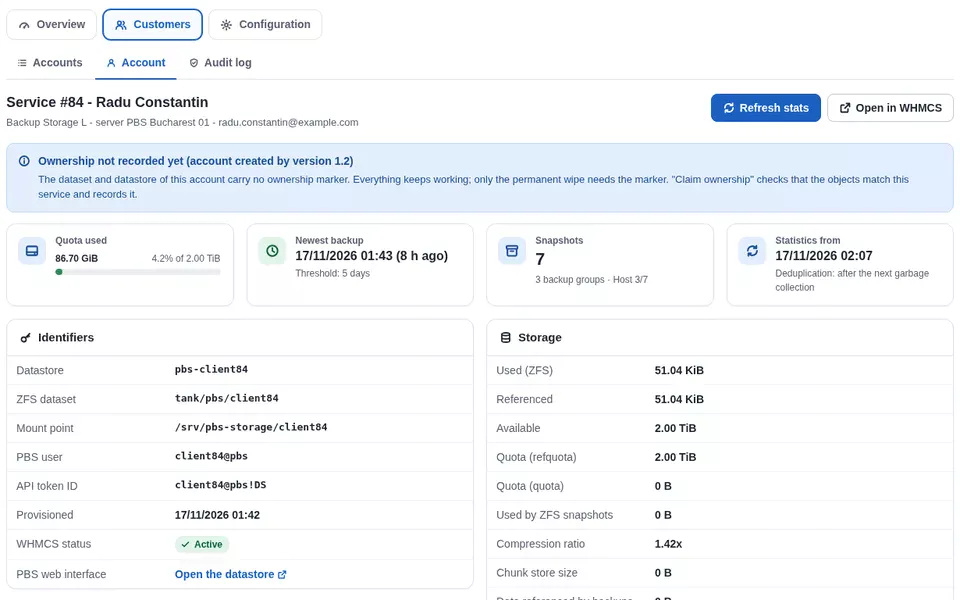
Service #1031 - Radu Constantin
Backup Storage M - server PBS Bucharest 01 - radu.constantin@example.org
pbs-client1031tank/pbs/client1031client1031@pbsclient1031@pbs!DSRemoves the PBS datastore with every backup, the ZFS dataset, the PBS user and its tokens. Allowed only for Terminated or Cancelled services. Try it: type the datastore name.
Audit log
Every action taken in this console and by the module: who, when, from which address, on which service, with which result.
| When | Admin | IP address | Action | Service | Result | Detail |
|---|---|---|---|---|---|---|
| 17/11/2026 10:42 | admin | 198.51.100.24 | Trust TLS certificate | pbs02 | OK | fingerprint 7C:19:5A:...:E7:10 accepted |
| 17/11/2026 09:15 | admin | 198.51.100.24 | Rotate API token | #1018 | OK | token secret replaced |
| 17/11/2026 03:00 | cron | - | Refresh statistics | 38 services | OK | 38 refreshed, 0 failed |
| 16/11/2026 18:27 | ops | 198.51.100.31 | Create (module) | #1042 | OK | dataset, datastore, user, token, ACL |
| 16/11/2026 14:03 | ops | 198.51.100.31 | Upgrade quota | #1031 | OK | 2.00 TiB → 4.00 TiB |
| 15/11/2026 11:50 | admin | 198.51.100.24 | Delete data permanently | #902 | OK | terminated 31 days ago, typed name confirmed |
Servers
Every PBS server added in WHMCS with the Proxmox Backup Storage module: capacity, quota sold and the datastores on it.
pbs01.example.net:8007OKpbs02.example.net:8007OKSetup
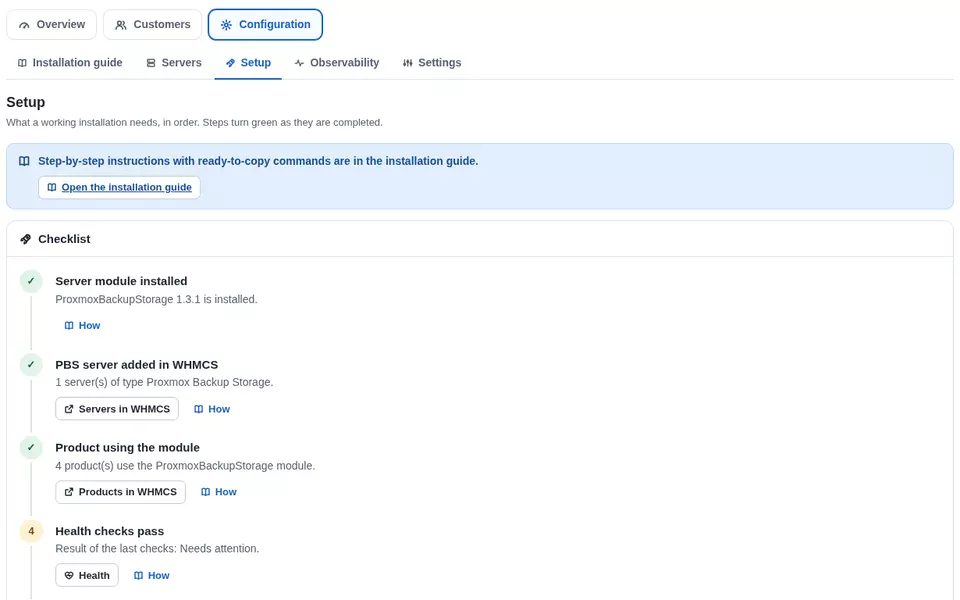
What a working installation needs, in order. Steps turn green as they are completed.
- ✓Server module installedProxmoxBackupStorage 1.3.1 is installed.
- ✓Licence activeChecked 2 h ago.
- ✓PBS server added in WHMCS2 servers of type Proxmox Backup Storage.
- ✓Product using the module3 products use the module.
- ✓Health checks passResult of the last checks: OK.
- ✓Storage size option3 of 3 products have the size option, with a price per TB in every currency.
Observability
Prometheus metrics and a JSON health check for your monitoring, protected by a bearer token.
Settings
Warning e-mails, audit retention, trusted reverse proxies and who may run dangerous actions.
A client area that answers the questions before the ticket
Usage and deduplication, every backup with restore steps, a Proxmox VE guide with the server fingerprint and copy buttons, command-line examples and the web interface login. In English and Romanian.
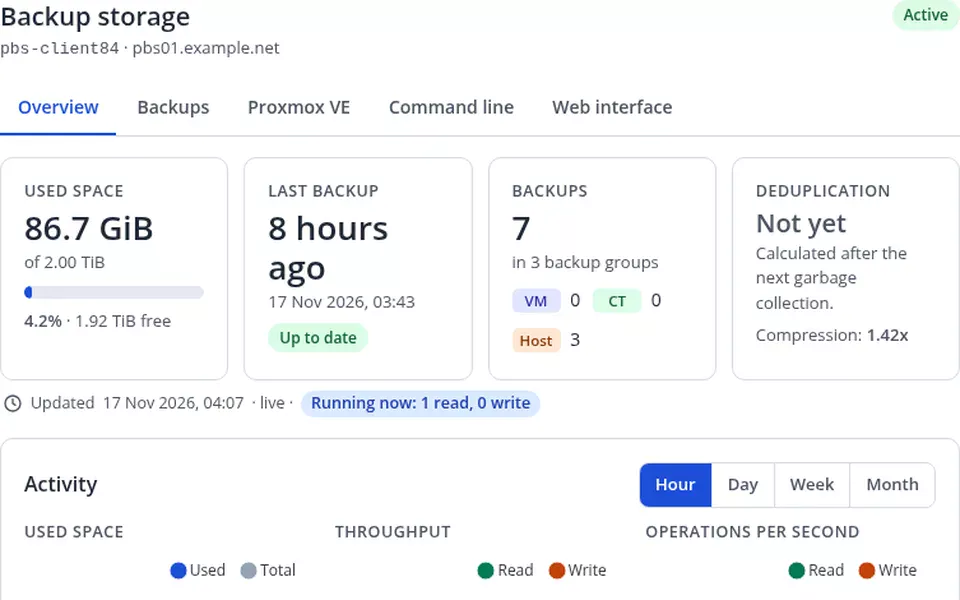
Backup storage
Activity - used space, last 30 days
Dashed line: your quota. Hour, day, week and month views in the real client area.
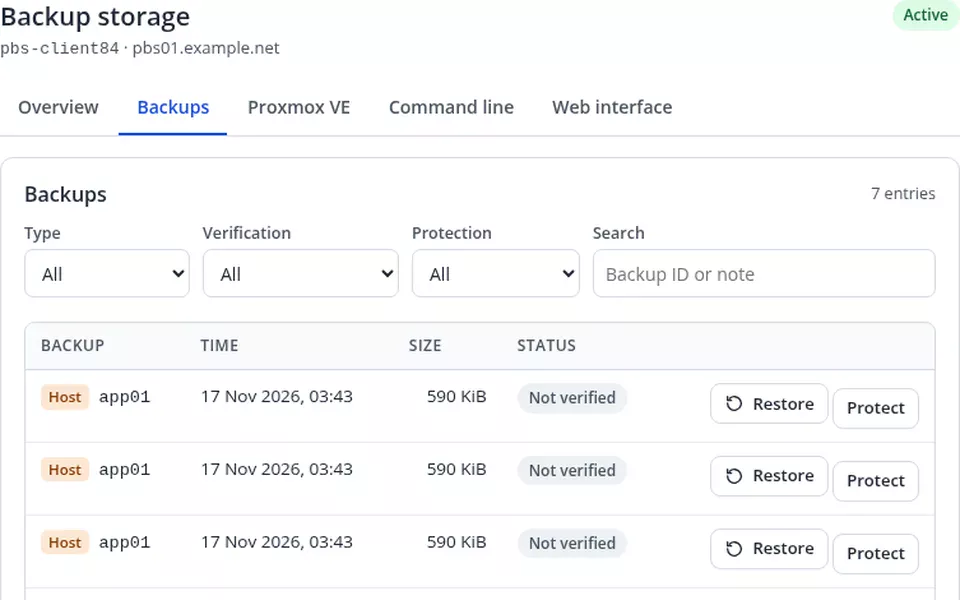
Backups - 214 entries
| Backup | Time | Size | Status | |
|---|---|---|---|---|
VM vm/101 | 17/11/2026 02:00 | 48.2 GiB | Verified Protected | |
VM vm/102 | 17/11/2026 02:06 | 112.7 GiB | Verified | |
CT ct/201 | 17/11/2026 02:15 | 6.4 GiB | Not verified | |
VM vm/101 | 16/11/2026 02:00 | 47.9 GiB | Verified |
Maintenance
Verify all backups or free unused space, at most once per hour. Every task shows up under Recent activity with its result.
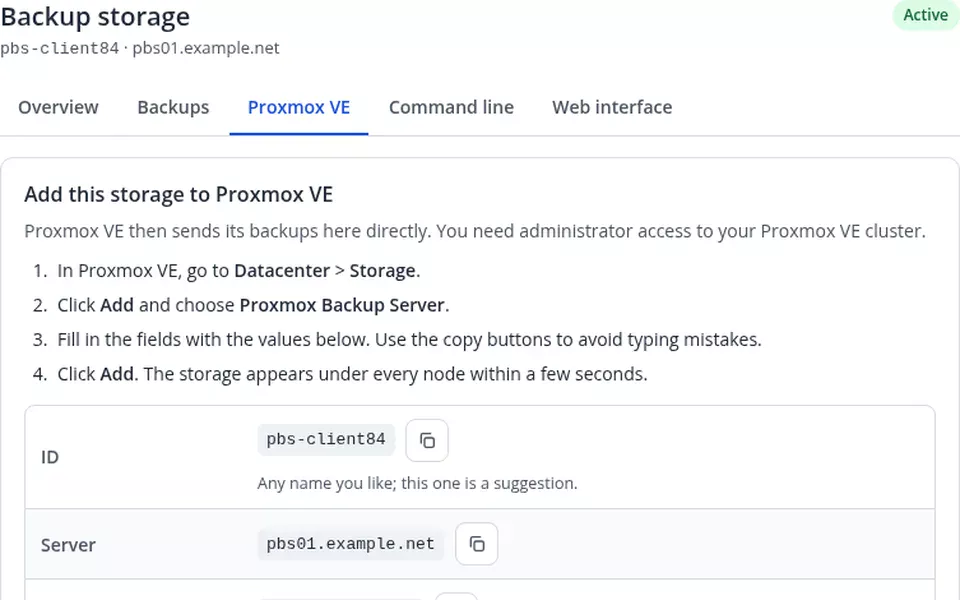
Add this storage to Proxmox VE
Datacenter > Storage > Add > Proxmox Backup Server, then fill in the values below. Use the copy buttons to avoid typing mistakes.
pbs-client1031pbs01.example.netclient1031@pbs!DSpbs-client10317C:19:5A:E2:90:4B:D3:61:0F:8A:2C:77:B5:E0:13:9D:46:A8:C1:3E:52:F9:08:6D:BB:24:71:CE:95:3A:E7:10Demo values. The secret is shown only after Show or Copy.
Encrypt your backups (recommended)
With client-side encryption your data is encrypted on your Proxmox VE node before it is sent. Keep your key safe: nobody, including your provider, can restore without it.
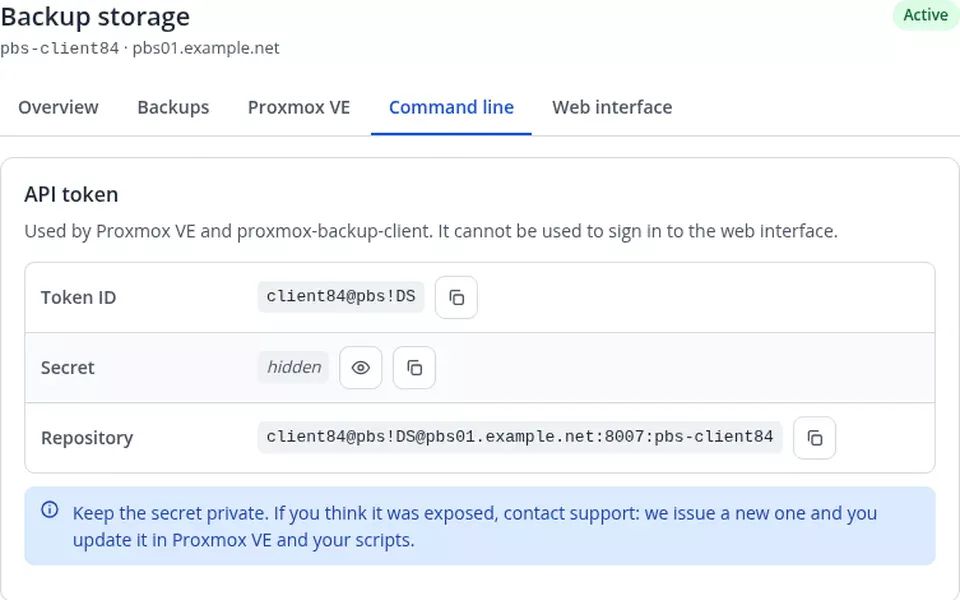
Back up a Linux server with proxmox-backup-client
The commands already contain your repository.
Proxmox Backup Server web interface
Browse your datastore, check tasks and set your own prune jobs directly in PBS.
https://pbs01.example.net:8007client1031@pbsSee the real module
Taken from a real installation (customer names replaced). Click any image to enlarge it.
What’s inside
Two modules that work together: the Proxmox Backup Storage server module that provisions every order, and the Proxmox Backup Admin console for you.
A datastore per order
Each service gets its own ZFS dataset (refquota or quota, zstd/lz4 compression) mounted as its own PBS datastore, with a garbage collection schedule spread across the week.
User, password and API token
A PBS user with a web password and an API token limited to that datastore, with a least-privilege role (DatastorePowerUser) by default.
Upgrades and downgrades online
The customer picks the size with a configurable option (TB or GB). The quota changes online, with pool capacity checks, and a downgrade below the space in use is refused.
Complete lifecycle
Suspend, unsuspend, terminate (data kept until you delete it), change password without touching the API token, repair and token rotation.
Several PBS servers
Use as many PBS servers as you like, with WHMCS server groups. The storage host can be the PBS machine itself or a separate ZFS host.
Idempotent and careful
Re-running Create or Repair never deletes anything. Each dataset and datastore carries an ownership marker, so the module never adopts data that belongs to another service.
Dashboard
Accounts, quota sold against pool capacity, used storage, accounts near their quota, late backups, stale statistics and server health on one page.
Health checks
PBS connection and version, token rights, certificate and SSH host key, sudo commands, ZFS pool capacity, failed jobs, the last cron run and customer roles.
Accounts and freshness
Filters for status, server, quota used, backup age and stale statistics, sortable columns, bulk usage refresh and CSV export ready for Excel.
Audit log
Every action with admin, IP address, service, result and readable details, filterable and exportable, with an optional retention period.
Setup checklist
A guided checklist from server module to first product, plus a builder for the storage size option with a price per TB in every currency.
Role-based permissions
Viewing, server operations, product changes and dangerous actions are separate levels. Buttons an admin may not use are shown disabled with the reason.
Usage at a glance
Used and free space against the quota, newest backup, backup groups and snapshots, deduplication and compression, with charts for hour, day, week and month.
Backup browser
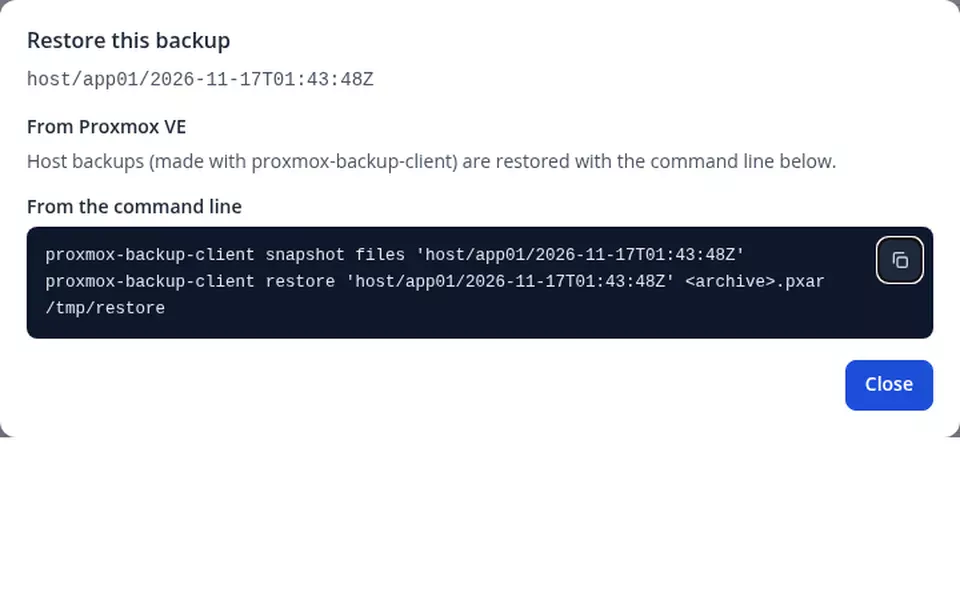
Every backup with filters, a restore dialog with exact steps, protect or unprotect, and verify or garbage collection jobs at most once per hour.
Proxmox VE and CLI guides
Copy-ready values with the server fingerprint, a pvesm one-liner and proxmox-backup-client examples, including client-side encryption. Secrets appear only after Show or Copy.
Certificate pinning
Self-signed PBS certificates are pinned and checked before the API token is sent; a renewed certificate is trusted from the Health page after you compare the fingerprint.
SSH host key checking
The storage host key is recorded at the first connection and checked before every login, with the same trust step after a reinstall.
Guarded deletion
Permanent deletion only from the console, only for Terminated or Cancelled services, only after typing the datastore name, and always recorded.
E-mail warnings
Optional e-mails for storage almost full and no recent backup (to the customer) and pool almost full (to you), from editable WHMCS templates in English and Romanian.
Prometheus and JSON health
A bearer-token protected metrics endpoint (usage, quota, last backup, pool usage, server health) and a JSON health check for uptime monitors.
Hardened for production
CSRF protection on every action, escaped output, permission checks on every request, throttling, and a licence check that never blocks existing services.
From upload to the first order in six steps
The full guide (INSTALL.txt) ships with the module and is in your client area. The console’s Setup page checks each step for you.
tank/pbs), a mount point base and an SSH user with a sudo rule for zfs, zpool, mkdir, chmod and chown.whmcs@pbs!whmcs, with the rights listed in the guide.Changelog
Newest first. Updating is uploading the new files over the old ones; database changes are applied automatically.
v1.3.1 17 November 2026 Latest
- New Step-by-step installation guide inside the console, from the storage host to the first order.
- New Redesigned admin console in English and Romanian: dashboard, server health checks, backup freshness, accounts with filters and CSV export, audit log, setup checklist and settings.
- New Server health page: PBS connection, API token permissions, certificate and SSH host key status (with a one-click trust step after a renewal), ZFS pool capacity, sudo rules and the last cron run.
- New Optional e-mail warnings: storage almost full, no recent backup, storage pool almost full.
- New New product options: size unit (TB or GB), size option name and garbage collection schedule. Existing products keep their current behaviour.
- Improvement Safer data handling: backups are deleted permanently only from the console, for terminated or cancelled services, after typing the datastore name.
- Improvement New services get a least-privilege role on their datastore; existing services can be migrated from the console when you are ready.
- Improvement Change Password no longer affects the API token used by Proxmox VE.
- Improvement Faster client area with rewritten Proxmox VE and command-line guides.
- Improvement Proxmox Backup Server 4.x support, more accurate usage statistics and new metrics (last backup time, server health).
- Security Security and reliability improvements throughout. Updating is recommended.
v1.2.2 October 2026
- New The module page shows the installed version and, when a newer release is published, an "Update available" badge and banner linking to your client area. Checked at most twice a day.
- Improvement Clearer update instructions: overwrite the files, no deactivation, database changes applied automatically.
v1.2.0 October 2026
- New Central fleet dashboard: every PBS account across all your servers, with live usage, quota and per-server capacity.
- New Full provisioning lifecycle: per-service datastores, users and API tokens with ZFS-backed quotas, plus refresh, repair, token rotation, suspend/unsuspend and guarded terminate.
- New Client-facing snapshot browser: customers inspect their backups, protect snapshots and start verify jobs.
- New Prometheus-compatible metrics endpoint, JSON health check and a built-in audit log.
- Improvement Two builds: ionCube Loader 14 (PHP 8.1-8.3) and ionCube Loader 15 (PHP 8.1-8.4).
Will it run on your setup?
A standard WHMCS server module plus an admin addon. No extra services, no message queue, no separate database.
- WHMCS
- WHMCS 8 (8.8 or newer) and WHMCS 9, with the cron running every 5 minutes
- PHP
8.1to8.4with the ionCube Loader: packageloader14for Loader 14 (PHP 8.1 - 8.3), packageloader15for Loader 15+ (PHP 8.1 - 8.4). Extensions curl, openssl, json, mbstring- Proxmox Backup Server
- PBS
3.3or newer and4.x(tested with 4.1 and 4.2); 3.1 and 3.2 work with small limits described in the guide - Storage host
- ZFS on the host that holds the datastores (usually the PBS machine), reachable over SSH; a dedicated user with sudo for zfs, zpool, mkdir, chmod and chown is recommended over root
- Network
- WHMCS to PBS on tcp/8007 and to the storage host on SSH; your customers to PBS on tcp/8007
- Languages
- Admin console, client area and e-mail templates in English and Romanian
- Licence
- Annual, one active installation per licence; existing services keep working even when the licence lapses
Downloads, updates and your licence key in your client area
Open your Proxmox Backup Admin service and a Downloads & Documentation panel gives you both packages (loader14 and loader15), the changelog, the installation guide and your licence key, for as long as your licence is active. New versions appear there automatically.
Every release, always
Download the package for your ionCube Loader straight from your service page. Per account, never a public link.
Free updates while active
Every new version is included for the whole licence term, and the console tells you when one is available.
One key, one installation
The same licence key activates the module inside WHMCS. Moving to a new server? Reissue it from your client area.
One annual licence
or 250 RON / year · $57 / year
- ✓ Server module + admin console
- ✓ Unlimited PBS servers and customers
- ✓ Free updates for the licence term
- ✓ WHMCS 8 & 9, PHP 8.1 – 8.4
- ✓ Support by ticket
You need your own Proxmox Backup Server on ZFS. Proxmox and Proxmox Backup Server are trademarks of Proxmox Server Solutions GmbH; this module is an independent product.
Frequently asked questions
What exactly does the module do?
It turns Proxmox Backup Server storage into a WHMCS product. For every order it creates a ZFS dataset with a quota on your storage host, a PBS datastore on that dataset, a PBS user and an API token limited to that datastore. Your customer adds the storage to Proxmox VE or uses proxmox-backup-client, and you manage every server from one admin console.
Why does it need SSH access to the storage host?
PBS itself has no per-datastore quota, so the module creates a ZFS dataset with a quota for every service. That is done over SSH. A dedicated non-root user with a sudo rule limited to zfs, zpool, mkdir, chmod and chown is enough, and the SSH host key is checked before every login.
What happens to the data when a service is terminated?
Access is removed but the data stays on disk. You delete it yourself, from the console only, for Terminated or Cancelled services, after typing the datastore name. Nothing is ever deleted by a module button on the service page.
Does it work with self-signed PBS certificates?
Yes. With SSL verification off, the module pins the certificate at the first administrator connection and never sends the API token to a different certificate. After a renewal, the Health page shows the new fingerprint and you trust it with one click once you have compared it.
Which package do I download?
There are two: loader14 for ionCube Loader 14 (PHP 8.1 to 8.3) and loader15 for ionCube Loader 15 or newer (PHP 8.1 to 8.4). Your client area shows both, together with the installation guide.
I run 1.2.x. Is the update safe for live customers?
Yes. Upload the new files over the old ones, without deactivating anything; database changes are applied automatically and existing services keep working. Nothing changes on PBS or ZFS until an administrator runs an action, and existing customers keep their role until you migrate them from the console.
What if my licence expires?
Existing services keep working: suspend, unsuspend, terminate, usage statistics and the client area are never blocked. Only new provisioning, storage upgrades and the console write actions wait until the licence is renewed.
Can I monitor it with Prometheus or an uptime checker?
Yes. The console generates a bearer token for a Prometheus metrics endpoint (usage, quota, last backup, pool usage, server health) and a JSON health endpoint. Both read stored data, so scraping is cheap.