Nextcloud for WHMCS
Sell Nextcloud storage straight from WHMCS, fully automated. Every order gets its own Nextcloud account on your server with the quota of its plan; your customers add their own sub-users and groups, and you run every account and server from one console with health checks, privacy presets and an audit log.
The admin console, live
Click through the same groups and pages as in version 1.2.1, including the new Installation guide. The data is simulated; nothing here connects to a server.
Nextcloud Admin v1.2.1
Accounts, server health and security presets of Nextcloud for WHMCS.
Dashboard
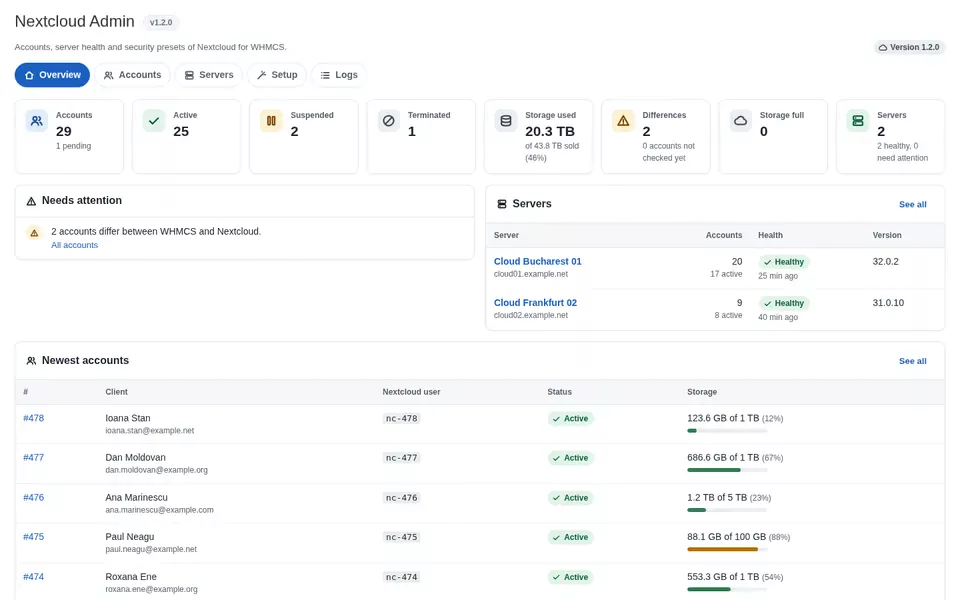
Stored figures from the last usage sync and health checks; opening this page does not contact Nextcloud.
- !2 accounts differ between WHMCS and Nextcloud.All accounts
- i1 deletion waits for your approval.Pending deletions
| Server | Accounts | Health | Nextcloud |
|---|---|---|---|
| Cloud Bucharest 01cloud01.example.net | 2017 active | Healthy25 min ago | 32.0.2 |
| Cloud Frankfurt 02cloud02.example.net | 98 active | Healthy40 min ago | 31.0.10 |
| # | Client | Nextcloud user | Status | Storage |
|---|---|---|---|---|
| #478 | Ioana Stanioana.stan@example.net | nc-478 | Active | 123.6 GB12% of 1 TB |
| #477 | Dan Moldovandan.moldovan@example.org | nc-477 | Active | 686.6 GB67% of 1 TB |
| #476 | Ana Marinescuana.marinescu@example.com | nc-476 | Active | 1.2 TB23% of 5 TB |
| #475 | Paul Neagupaul.neagu@example.net | nc-475 | Active | 88.1 GB88% of 100 GB |
| #474 | Roxana Eneroxana.ene@example.org | nc-474 | Active | 553.3 GB54% of 1 TB |
All accounts
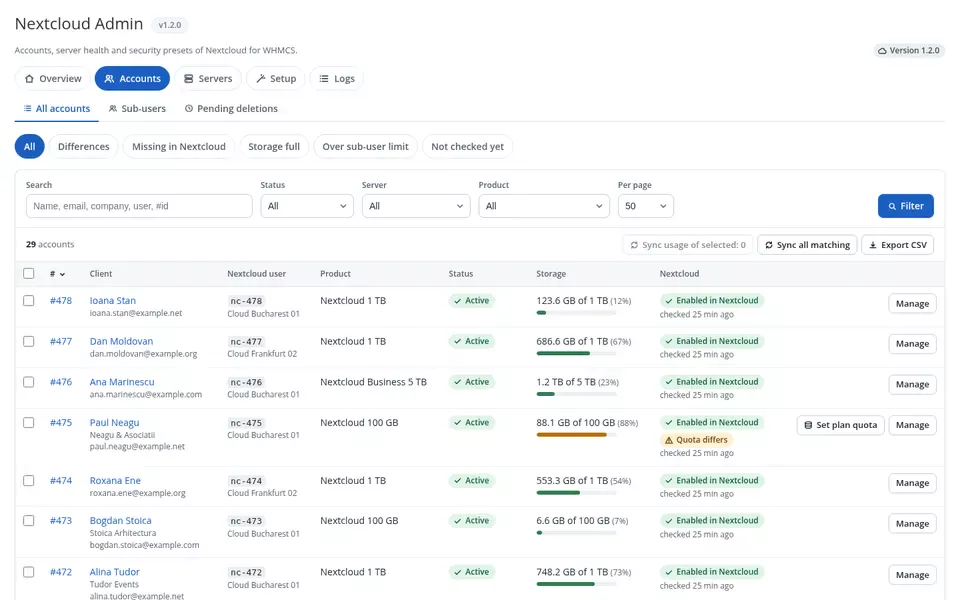
Every Nextcloud account sold through WHMCS, on all servers. Filters, sorting and paging run in the database; the CSV export uses the same filters.
| # | Client | Nextcloud user | Product | Status | Storage | Nextcloud | |
|---|---|---|---|---|---|---|---|
| #478 | Ioana Stanioana.stan@example.net | nc-478Cloud Bucharest 01 | Nextcloud 1 TB | Active | 123.6 GB12% of 1 TB | Enabled in Nextcloud | |
| #477 | Dan Moldovandan.moldovan@example.org | nc-477Cloud Frankfurt 02 | Nextcloud 1 TB | Active | 686.6 GB67% of 1 TB | Enabled in Nextcloud | |
| #476 | Ana Marinescuana.marinescu@example.com | nc-476Cloud Bucharest 01 | Nextcloud Business 5 TB | Active | 1.2 TB23% of 5 TB | Enabled in Nextcloud | |
| #475 | Paul Neagupaul.neagu@example.net | nc-475Cloud Bucharest 01 | Nextcloud 100 GB | Active | 88.1 GB88% of 100 GB | Enabled in Nextcloud Quota differs | |
| #474 | Roxana Eneroxana.ene@example.org | nc-474Cloud Frankfurt 02 | Nextcloud 1 TB | Active | 553.3 GB54% of 1 TB | Enabled in Nextcloud | |
| #473 | Bogdan Stoicabogdan.stoica@example.com | nc-473Cloud Bucharest 01 | Nextcloud 100 GB | Active | 6.6 GB7% of 100 GB | Enabled in Nextcloud | |
| #469 | Cristina Pavelcristina.pavel@example.com | nc-469Cloud Bucharest 01 | Nextcloud 1 TB | Suspended | 942.3 GB92% of 1 TB | Disabled in Nextcloud | |
| #458 | Andrei Popescuandrei.popescu@example.com | nc-458Cloud Bucharest 01 | Nextcloud 1 TB | Active | 287.8 GB28% of 1 TB | Enabled in Nextcloud |
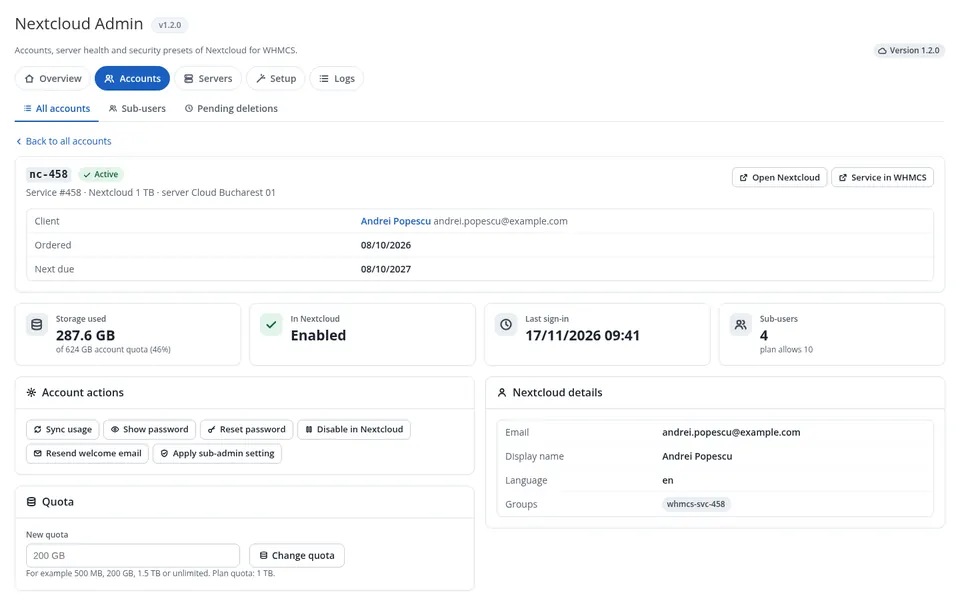
nc-458 Active
Service #458 - Nextcloud 1 TB - server Cloud Bucharest 01 - Andrei Popescu
For example 500 MB, 200 GB, 1.5 TB or unlimited. Plan quota: 1 TB; sub-users have 440 GB of it.
| Nextcloud user | Status | Storage | Last sign-in | |
|---|---|---|---|---|
nc-458-anaAna Popa | ana.popa@example.com | Enabled | 71.8 GB36% of 200 GB | 17/11/2026 08:12 |
nc-458-danDan Marin | dan.marin@example.com | Enabled | 42.5 GB35% of 120 GB | 16/11/2026 18:40 |
nc-458-elenaElena Stan | elena.stan@example.com | Enabled | 12.9 GB16% of 80 GB | 14/11/2026 11:05 |
nc-458-raduRadu Georgescu | radu.georgescu@example.com | Disabled | 3.1 GB8% of 40 GB | 02/11/2026 16:27 |
Deletes the Nextcloud user nc-458 with all files, its sub-users and groups. Terminating a service in WHMCS never deletes data; only this button (or an approved deletion) does. Try it: type the user name.
Sub-users
Every sub-user created by your customers, with its own quota carved out of the plan.
| Nextcloud user | Account | Status | Storage |
|---|---|---|---|
nc-458-anaAna Popa | #458Andrei Popescu | Enabled | 71.8 GB36% of 200 GB |
nc-458-danDan Marin | #458Andrei Popescu | Enabled | 42.5 GB35% of 120 GB |
nc-476-officeOffice | #476Ana Marinescu | Enabled | 402.7 GB39% of 1 TB |
nc-476-designDesign | #476Ana Marinescu | Enabled | 611.0 GB60% of 1 TB |
nc-471-ionIon Vasile | #471Radu Constantin | Enabled | 55.9 GB22% of 250 GB |
nc-458-raduRadu Georgescu | #458Andrei Popescu | Disabled | 3.1 GB8% of 40 GB |
Pending deletions
Products with "Delete After Termination" queue terminated accounts here. Nothing is deleted without your approval.
| Account | Terminated | Deletion date | |
|---|---|---|---|
nc-462Laura Georgescu - 18.4 GB | 10/11/2026 | 24/11/2026waiting for approval |
Servers and health
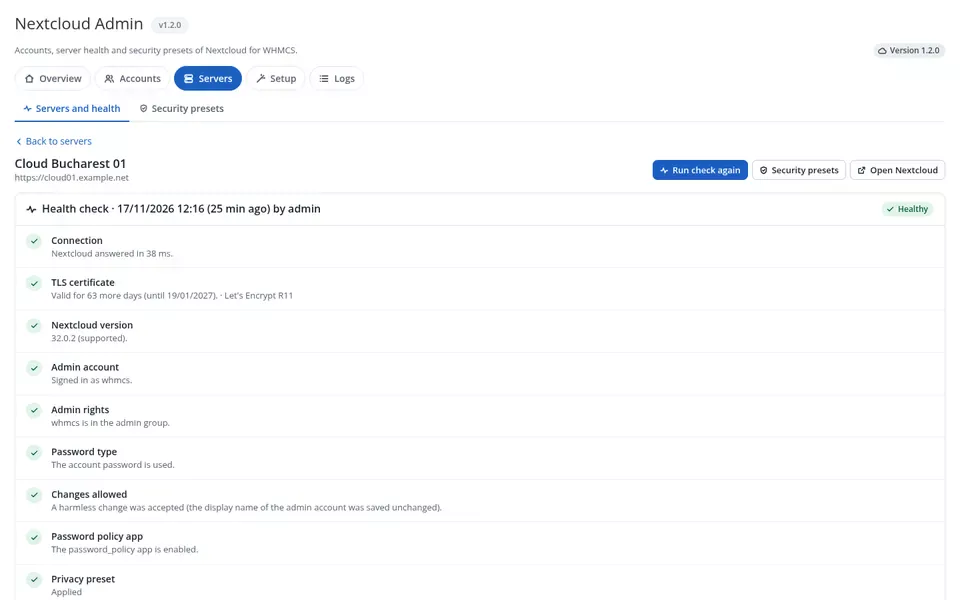
Every Nextcloud server added in WHMCS with this module, with the result of its last health check.
cloud01.example.netHealthycloud02.example.netHealthyCloud Bucharest 01
https://cloud01.example.net
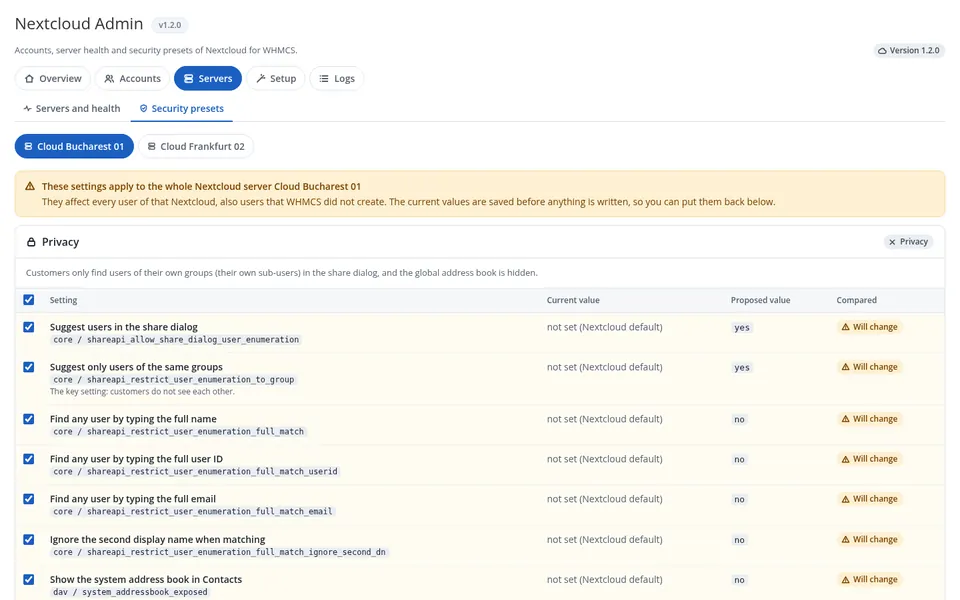
They affect every user of that Nextcloud. The current values are saved before anything is written, so you can put them back.
Customers only find users of their own groups in the share dialog, and the global address book is hidden.
| Setting | Current value | Proposed | Compared | |
|---|---|---|---|---|
Suggest only users of the same groupscore / shareapi_restrict_user_enumeration_to_group | not set (Nextcloud default) | yes | Will change | |
Find any user by typing the full namecore / shareapi_restrict_user_enumeration_full_match | not set (Nextcloud default) | no | Will change | |
Find any user by typing the full emailcore / shareapi_restrict_user_enumeration_full_match_email | no | no | Same | |
Show the system address book in Contactsdav / system_addressbook_exposed | not set (Nextcloud default) | no | Will change |
| # | Date | Admin | Settings | |
|---|---|---|---|---|
| #2 | 12/11/2026 10:05 | Admin | 12 | |
| #1 | 03/11/2026 16:48 | Admin | 7 | Restored |
Installation guide
Follow the steps in order. The badges show what this WHMCS already has, read from the database and the last saved health check.
- WHMCS 8.10+ or 9 - this installation: WHMCS 9.0.2
- PHP 8.3.14 with ionCube Loader 15.0 - package loader15
- cURL and JSON extensions present
- Licence active
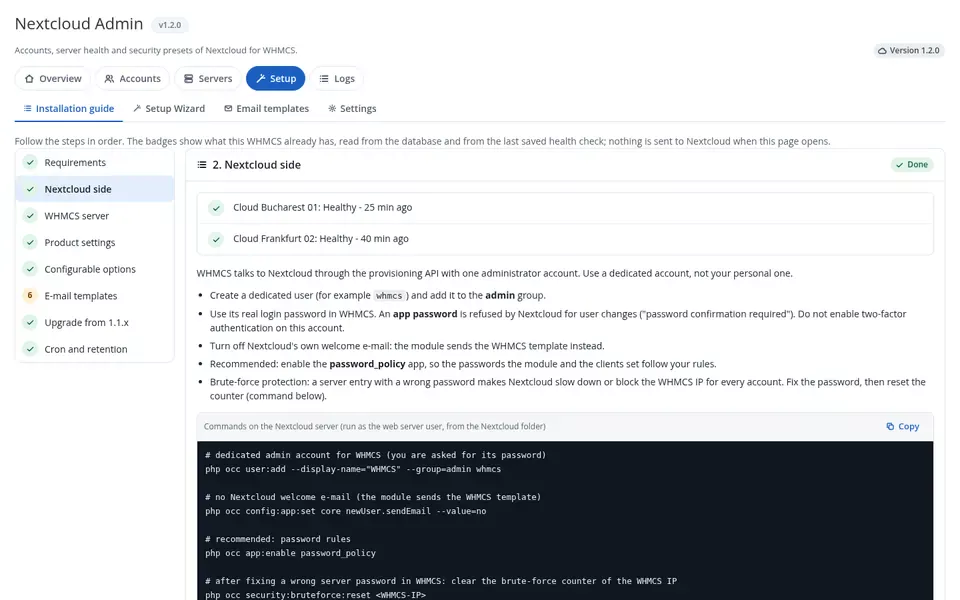
WHMCS talks to Nextcloud through the provisioning API with one administrator account. Use a dedicated account, not your personal one.
Configuration > System Settings > Servers > Add New Server: module Nextcloud, hostname without https://, the WHMCS admin account and its login password, Secure ticked.
Products using the module: 3. Every product was saved after the update, so hooks, usage sync and the order slider are active. Welcome Email on the product is set to None (the module sends its own).
Option group "Nextcloud Storage" (Storage|TB, Sub-Users|users, Groups|groups) is linked to 3 products, with prices in every currency.
"Nextcloud Quota Warning" has no Romanian translation yet. Create it, or edit the English text first.
Upload both folders over the old ones, without deactivating anything, then save each Nextcloud product once. Database changes are applied automatically.
Last WHMCS cron 3 h ago. Daily: usage sync, quota warnings at 80, 90 and 95%, approved deletions. Delete After Termination is off for 2 products, 14 days for 1.
Setup Wizard
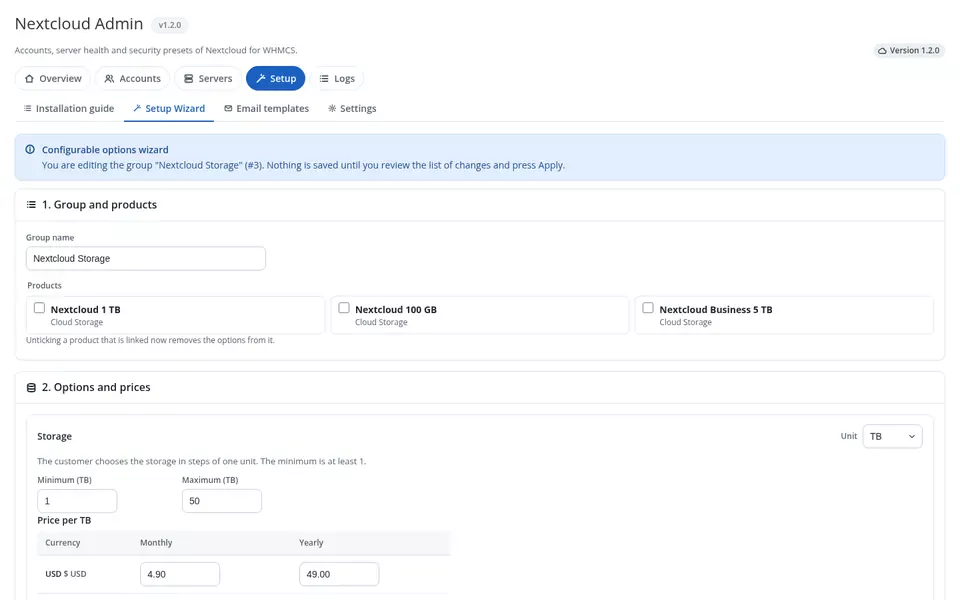
Creates the order options (storage slider, sub-users, groups) with prices in every currency and links them to your products. Nothing is saved until you review the list of changes.
| Currency | Storage, monthly per TB | yearly | Sub-user, monthly | yearly |
|---|---|---|---|---|
| EUR | ||||
| RON | ||||
| USD |
Email templates
Created automatically, in English with a Romanian translation, and never overwritten. Edit them under Configuration > Email Templates.
| Template | Status | Merge fields |
|---|---|---|
| Nextcloud Account Welcomesent after creation and by Resend Welcome Email | Present - EN, RO | {$nc_login_url}{$nc_username}{$service_password}{$nc_webdav_url}{$nc_quota} |
| Nextcloud Quota Warningdaily cron at 80, 90 and 95% | Present - EN only | {$quota_percent}{$used}{$total}{$upgrade_url} |
Settings
Console options and who may do what. Each action follows the WHMCS role permissions of the administrator.
| Action | WHMCS permission | Your role |
|---|---|---|
| View accounts, sub-users, CSV export | View Clients Products/Services | Yes |
| Sync, reset, enable / disable, quota, fixes | Perform Server Operations | Yes |
| Permanent deletes, approve deletions | + Delete Clients Products/Services | Yes |
| Health check, presets | Configure Servers | Yes |
| Setup Wizard | Edit Products/Services | Yes |
Audit log
Every action of admins, customers and the module: who, when, on which account and with which result.
| When | Who | Action | Service | Target | Result | Detail |
|---|---|---|---|---|---|---|
| 17/11/2026 12:24 | Admin | Sub-user created | #458 | nc-458-elena | OK | quota 80 GB |
| 17/11/2026 12:01 | System | Account created | #477 | nc-477 | OK | welcome email sent |
| 17/11/2026 11:16 | Admin | Health check | - | Cloud Bucharest 01 | OK | healthy |
| 17/11/2026 10:14 | Andrei Popescu | Group created | #458 | Marketing | OK | - |
| 17/11/2026 09:00 | System | Usage sync | - | 29 services | OK | - |
| 17/11/2026 07:36 | Admin | Quota changed | #466 | nc-466 | OK | 500 GB → 1 TB |
| 17/11/2026 05:36 | System | Quota warning | #446 | nc-446 | OK | 90% |
Module log
The WHMCS module log for Nextcloud calls, with passwords redacted. Needs WHMCS module logging turned on.
A client area that lets customers run their own team
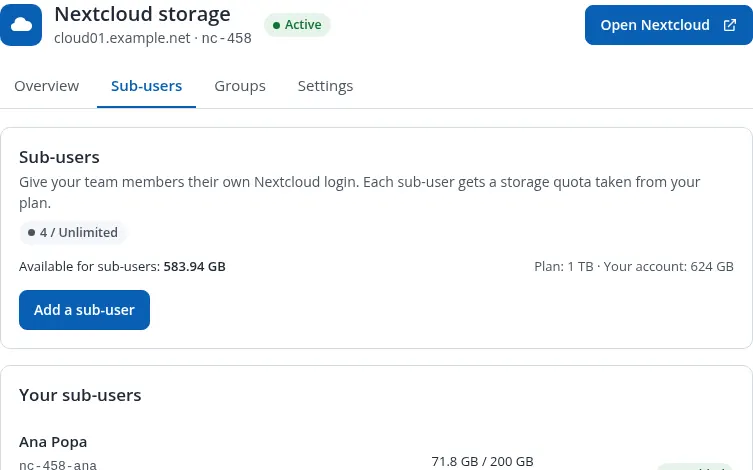
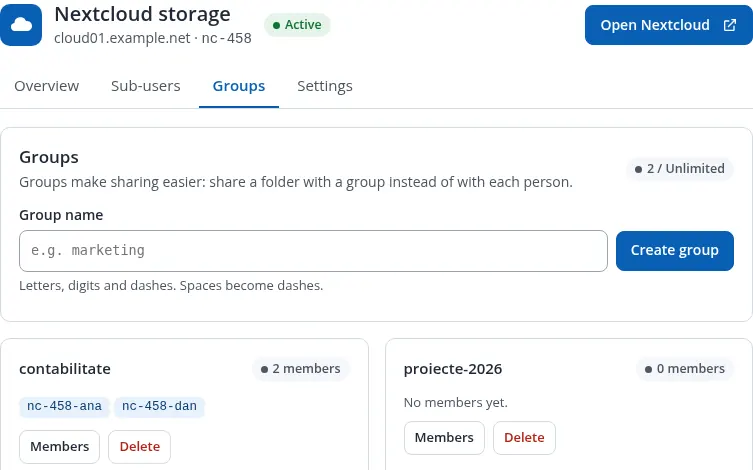
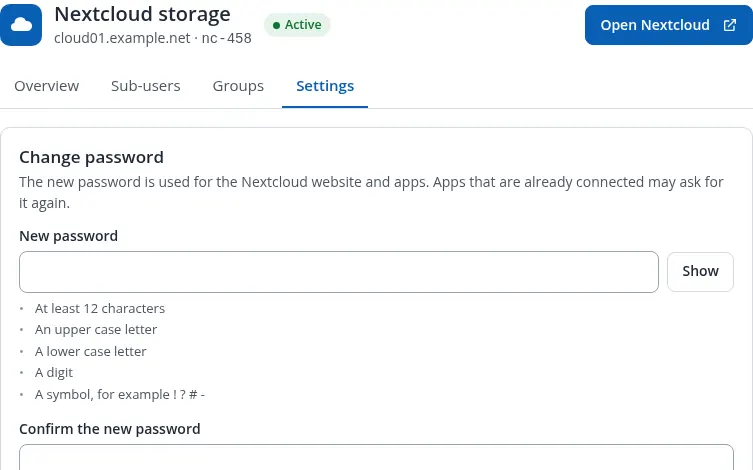
Storage use, login and WebDAV details with copy buttons, links to the desktop and mobile apps, sub-users with their own quota, groups and account settings. In English and Romanian.
Nextcloud storage
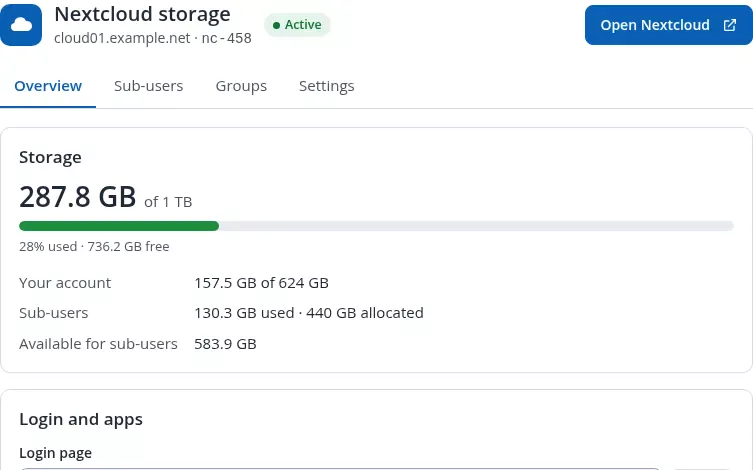
Storage
287.8 GB of 1 TB
28% used - 736.2 GB free
Login and apps
https://cloud01.example.net/login?user=nc-458nc-458https://cloud01.example.net/remote.php/dav/files/nc-458/Desktop appWindows, macOS, Linux
AndroidGoogle Play
iPhone, iPadApp Store
Demo values. The password is never part of the page; it is loaded only when you press Show password.
Team - 4 sub-users, 2 groups
- Ana Popa
nc-458-ana71.8 GB / 200 GBEnabled - Dan Marin
nc-458-dan42.5 GB / 120 GBEnabled - Elena Stan
nc-458-elena12.9 GB / 80 GBEnabled - Radu Georgescu
nc-458-radu3.1 GB / 40 GBDisabled
Sub-users 4 / 10
Give your team members their own Nextcloud login. Each sub-user gets a storage quota taken from your plan.
Your sub-users
- Ana Popa
nc-458-ana
ana.popa@example.com - last login 17/11/2026 08:1271.8 GB / 200 GBEnabled - Dan Marin
nc-458-dan
dan.marin@example.com - last login 16/11/2026 18:4042.5 GB / 120 GBEnabled - Elena Stan
nc-458-elena
elena.stan@example.com - last login 14/11/2026 11:0512.9 GB / 80 GBEnabled - Radu Georgescu
nc-458-radu
radu.georgescu@example.com - last login 02/11/2026 16:273.1 GB / 40 GBDisabled
Groups 2 / 5
Groups make sharing easier: share a folder with a group instead of with each person.
Marketing 2 members
nc-458-ananc-458-danAccounting 1 member
nc-458-elenaChange password
- At least 12 characters
- Upper and lower case letters, a digit and a symbol
Display name
Used for password recovery and notifications. You can also sign in with it.
See the real module
Version 1.2.0 on a test installation with demo customers. Click any image to enlarge it.
What’s inside
Two modules that work together: the Nextcloud server module that provisions every order and runs the client area, and the Nextcloud Admin console for you.
An account per order
Each service gets its own Nextcloud user, its own service group and the quota of its plan, created through the official provisioning API. No SSH, no shell scripts.
Plans in GB or TB
Storage from the product or from a configurable option with a slider, sold in GB or TB, or unlimited. Upgrades and downgrades apply the new quota at once.
Complete lifecycle
Suspend, unsuspend, terminate (data kept), password changes and a daily usage sync into the WHMCS disk usage columns.
Sub-users and groups
Limits per product or per configurable option, so you can sell extra sub-users and groups. Each sub-user gets its own quota inside the plan.
WHMCS e-mail templates
Welcome and quota warning (80, 90 and 95%) e-mails in English and Romanian, created automatically, fully editable and never overwritten.
Several Nextcloud servers
As many servers as you like, filled in turn with WHMCS server groups, with an optional public address per server for customer links.
Dashboard
Accounts by status, storage sold and used, differences between WHMCS and Nextcloud, full accounts and server health on one page.
All accounts
Every account on every server with quick filters, search, sorting, bulk usage sync, CSV export and an account page with safe actions.
Server health check
Connection, certificate expiry, Nextcloud version, admin rights, write test, presets, templates, cron and accounts that do not match, with one-click fixes.
Setup Wizard
Builds the storage, sub-user and group order options with monthly and yearly prices in every currency, with a review step before anything is saved.
Installation guide
A step-by-step guide inside WHMCS, from preparing Nextcloud to the first order, that marks each step as done or to do for your installation.
Audit log and permissions
Every action of admins, customers and the module is logged. Each console action follows the WHMCS permissions of the administrator's role.
Storage overview
Used and free space against the plan, split between the main account and the sub-users, with a clear notice before the plan is full.
Login and apps
Login page, username and WebDAV address with copy buttons, links to the desktop and mobile apps; the password is shown only on request.
Team management
Customers create, edit, disable and delete sub-users, reset their passwords and manage groups, within the limits of their plan.
Privacy preset
Customers on a shared Nextcloud only find users of their own groups when sharing, and the global address book is hidden.
Hardening preset
Public links with password and expiry, no re-sharing, no federation and a strong password policy. Every change is saved first and can be restored.
Data kept by default
Terminate never deletes files. Deletion happens only from the console after typing the name, or through an approved deletion request.
No passwords in pages
Passwords are never part of a page; they are loaded on request and redacted in the module log.
Tenant isolation
The module manages only the users and groups it created and checks on every action that a sub-user or group belongs to the service.
Hardened for production
HTTPS with certificate checks by default, CSRF protection on every action, escaped output and a licence check that never blocks existing accounts.
From upload to the first order in six steps
The full guide (INSTALL.txt) ships with the module and is in your client area. The console’s Installation guide checks each step for you.
whmcs) with its normal login password, turn off Nextcloud’s own welcome e-mail and enable password_policy.Changelog
Newest first. Updating is uploading the new files over the old ones; database changes are applied automatically.
v1.2.1 17 November 2026 · includes 1.2.0 Latest
- Security License verification hardened: a temporary network error during a license check no longer disables a valid license. Updating is recommended.
- Fix Display fixes: singular wording for single items on the dashboard, Romanian decimal comma for storage sizes in the client area, and a cleaner product list in the Setup Wizard.
- New Redesigned admin console in English and Romanian: dashboard with the items that need attention, every account across all servers with filters, CSV export and bulk usage sync, account detail, audit log and settings.
- New Server health check: connection, certificate and expiry, Nextcloud version, admin rights, write test, presets and accounts that do not match WHMCS, with safe one-click fixes.
- New New Installation guide page in the admin console, with the status of each step for your installation.
- New Privacy and Hardening presets now show current and proposed values side by side, let you choose each setting and can restore the previous values.
- New Sub-users get their own quota carved out of the plan; product limits for sub-users and custom groups are enforced.
- New New product settings: "Sub-User Management in Nextcloud" and "Delete After Termination (days)" with an admin approval queue. Termination still keeps the data by default.
- New Welcome and quota warning e-mails as WHMCS templates in English and Romanian (created automatically, editable, never overwritten); one welcome e-mail per account.
- Improvement Redesigned client area: storage overview, login and app details, sub-users, groups and account settings; the password is shown only on request.
- Improvement Setup Wizard with a review step, storage in GB or TB and prices per currency; the order form slider applies only to this module's options.
- Improvement Optional public address per server for links shown to customers, and HTTPS by default.
- Security Security and reliability improvements throughout. Updating is recommended.
v1.1.2 31 October 2026
- New The module page shows the installed version and, when a newer release is published, an "Update available" badge and a banner linking to your client area. Checked at most twice a day; never affects licensing or normal operation.
- Improvement Clearer update instructions: overwrite the files, no deactivation, database changes applied automatically.
v1.1.0 13 October 2026
- New Central admin dashboard across all your Nextcloud servers: global statistics, account search and filters, per-server status and one-click Privacy and Hardening presets.
- New Full provisioning lifecycle: create, suspend, unsuspend, terminate (disable, data preserved), quota changes, password changes and usage sync into WHMCS.
- New Client area with storage overview, sub-user management, custom groups and account settings.
- New Setup Wizard for the drag-to-select order options (storage, sub-users, groups) with prices per currency.
- Improvement Two builds: ionCube Loader 14 (PHP 8.1-8.3) and ionCube Loader 15 (PHP 8.1-8.4).
Will it run on your setup?
A standard WHMCS server module plus an admin addon. No extra services, no agents on the Nextcloud server, no separate database.
- WHMCS
- WHMCS 8 (8.10 or newer) and WHMCS 9, with the cron running at least once a day
- PHP
8.1to8.4with the ionCube Loader: packageloader14for Loader 14 (PHP 8.1 - 8.3), packageloader15for Loader 15+ (PHP 8.1 - 8.4). Extensions curl and json. The website and the cron must both use a covered PHP version- Nextcloud
- Nextcloud
28or newer (tested up to32), with a dedicated account in theadmingroup (its normal password, two-factor off for that account) - Network
- WHMCS to Nextcloud over HTTPS with a valid certificate; WHMCS to dreamserver.ro over HTTPS for the licence check
- Languages
- Admin console, client area and e-mail templates in English and Romanian
- Licence
- Annual, one WHMCS installation per licence; existing accounts keep working even when the licence lapses
Downloads, updates and your licence key in your client area
Open your Nextcloud for WHMCS service and a Downloads & Documentation panel gives you both packages (loader14 and loader15), the changelog, the installation guide and your licence key, for as long as your licence is active. New versions appear there automatically.
Every release, always
Download the package for your ionCube Loader straight from your service page. Per account, never a public link.
Free updates while active
Every new version is included for the whole licence term, and the console tells you when one is available.
One key, one installation
The same licence key activates the module inside WHMCS. Moving to a new server? Reissue it from your client area.
One annual licence
or 150 RON / year · $34 / year
- ✓ Server module + admin console
- ✓ Unlimited Nextcloud servers and customers
- ✓ Free updates for the licence term
- ✓ WHMCS 8 & 9, PHP 8.1 – 8.4
- ✓ Support by ticket
You need your own Nextcloud server. Nextcloud and the Nextcloud logo are registered trademarks of Nextcloud GmbH; this module is an independent product by DreamServer, not affiliated with or endorsed by Nextcloud GmbH.
Frequently asked questions
What exactly does the module do?
It sells Nextcloud storage as a WHMCS product. Every order gets its own Nextcloud account on your server, with the quota of the plan, created through the official Nextcloud provisioning API. Suspend, unsuspend, terminate, upgrades and password changes follow billing automatically, and you manage every account and server from one admin console.
Do I need SSH or root access to the Nextcloud server?
No. The module talks to Nextcloud only over HTTPS, with one dedicated Nextcloud admin account. You run a couple of occ commands once, when you prepare Nextcloud; the Installation guide in the console lists them ready to copy.
Can several customers share one Nextcloud server safely?
Yes. Each service has its own group and the module only manages the users and groups it created. The Privacy preset makes the share dialog show only users of the customer's own groups and hides the global address book, so customers do not see each other.
What happens to the data when a service is terminated?
By default nothing is deleted: Terminate disables the account and its sub-users and keeps the files. You can delete an account from the console after typing its name, or set "Delete After Termination" on a product; every such deletion waits for an admin approval.
How do sub-users and quotas work?
Customers create sub-users from the client area, each with its own quota taken from the plan; the sum can never exceed the plan. Limits for sub-users and groups come from the product or from configurable options, so you can sell them as extras.
Which package do I download?
There are two: loader14 for ionCube Loader 14 (PHP 8.1 to 8.3) and loader15 for ionCube Loader 15 or newer (PHP 8.1 to 8.4). Both the WHMCS website and the WHMCS cron must run a PHP version covered by the package you choose.
I run 1.1.x. Is the update safe for live customers?
Yes. Upload both folders over the old ones without deactivating anything, then save each Nextcloud product once. Database changes are applied automatically and existing accounts keep working.
What if my licence expires?
Existing accounts keep working: suspend, unsuspend, terminate, password changes, usage sync, the client area and the cron are never blocked. Only new accounts and the console write actions wait until the licence is renewed.