IPAM Bridge for WHMCS
IP address management with Proxmox VE VPS & Cloud and NetBox integration. Subnets, IPv4 and IPv6 addresses, gateways and VLANs for every service, kept in NetBox or directly in WHMCS: it works standalone or with NetBox. New virtual machines get their addresses automatically, and your clients can set their own reverse DNS.
Formerly "IP Manager 3 NetBox". Same module, same licence key: an update keeps everything.
The admin console, live
Click through the same groups and pages as in version 1.1.3: the subnet map, the backend switch between NetBox and the built-in store, the conversion wizard, the CSV import and the installation guide. The data is simulated; nothing here connects to a server.
IPAM Bridge for WHMCS v1.1.3
IP address management with Proxmox VE VPS & Cloud and NetBox integration.
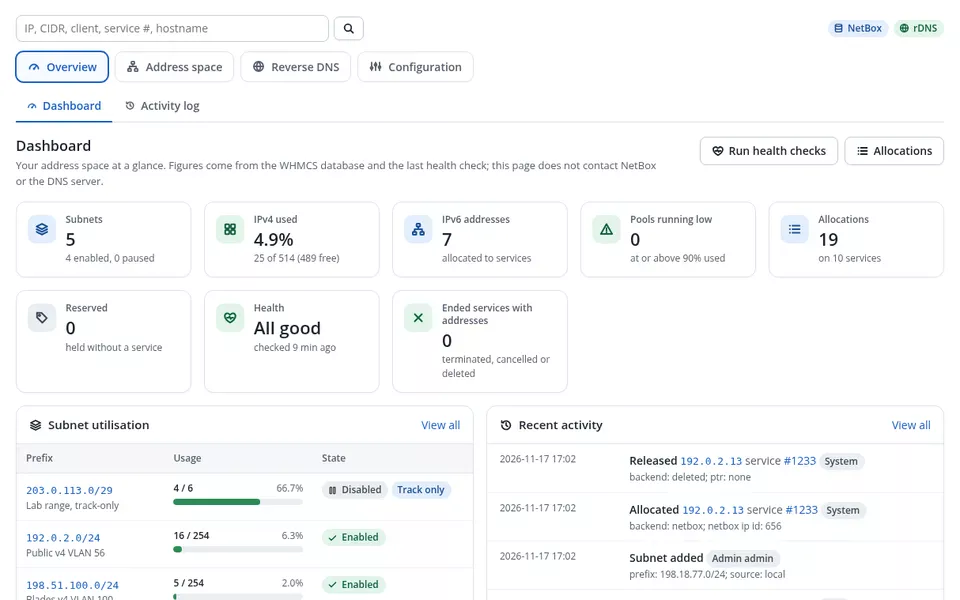
Dashboard
Your address space at a glance. Figures come from the WHMCS database and the last health check; this page does not contact NetBox or the DNS server.
| Prefix | Usage | State |
|---|---|---|
203.0.113.0/24Public IPv4 Bucharest | 112 / 25444% | Enabled |
198.51.100.0/25Dedicated and colocation | 117 / 12693% | Low |
2001:db8:120::/64Public IPv6 Bucharest | 61 used (large IPv6 prefix) | Enabled |
2001:db8:140::/64IPv6 dedicated | 13 used (large IPv6 prefix) | Enabled |
| When | Event |
|---|---|
| 17/11/2026 12:41 | Allocated 203.0.113.10 service #1482System |
| 17/11/2026 12:41 | Allocated 2001:db8:120::a service #1482System |
| 17/11/2026 11:58 | rDNS set by client 203.0.113.14 service #1460Client #312 |
| 17/11/2026 10:20 | Reserved 203.0.113.250Admin |
| 17/11/2026 09:02 | Released 203.0.113.37 service #1398Cron |
New dedicated orders still get addresses, but only 9 are left. Add a subnet or lower the warning threshold in Settings.
Activity log
Every allocation, release, reservation, rDNS change and setting change, with who did it. Filter and export as CSV.
| When | Event | Address | Service | Who | Detail |
|---|---|---|---|---|---|
| 17/11/2026 12:41 | Allocated | 203.0.113.10 | #1482 | System | backend: NetBox; on service creation |
| 17/11/2026 11:58 | rDNS set by client | 203.0.113.14 | #1460 | Elena Marin | mail.example.net |
| 17/11/2026 10:20 | Reserved | 203.0.113.250 | - | Admin | router VRRP |
| 17/11/2026 09:02 | Released | 203.0.113.37 | #1398 | Cron | service terminated; PTR removed |
| 16/11/2026 18:30 | Upgrade top-up | 203.0.113.12 | #1479 | System | 2 IPv4 per plan, 1 added |
| 16/11/2026 14:12 | Subnet added | 2001:db8:140::/64 | - | Admin | source: NetBox prefix #18 |
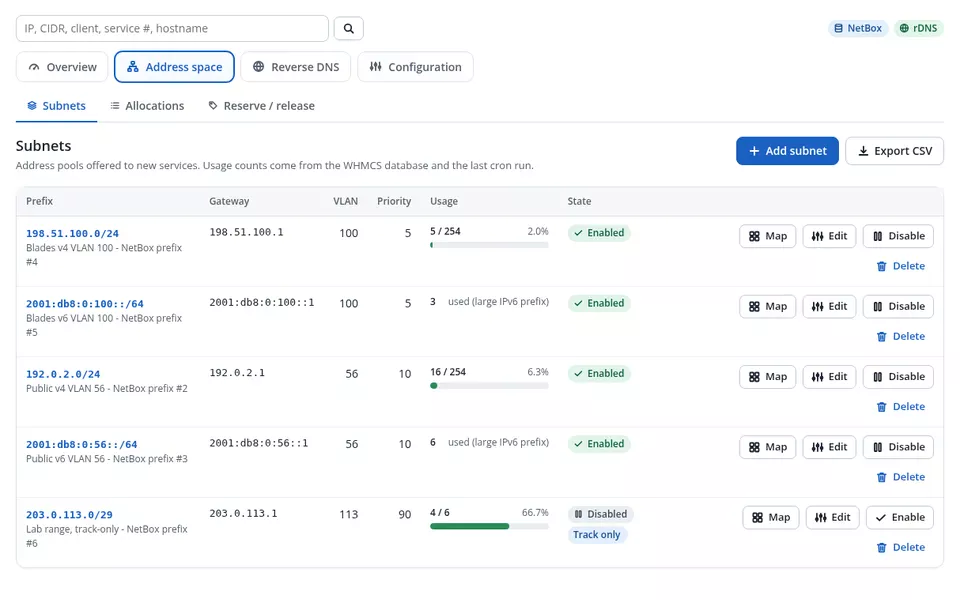
Subnets
The pools new services take addresses from. Lower priority numbers are used first; restrictions to products or servers narrow the choice.
| Prefix | VLAN | Gateway | Prio | Usage | State |
|---|---|---|---|---|---|
203.0.113.0/24Public IPv4 Bucharest - all products | 120 | 203.0.113.1 | 10 | 112 / 254 | Enabled |
198.51.100.0/25Dedicated and colocation - Dedicated, Colocation | 140 | 198.51.100.1 | 5 | 117 / 126 | Low |
2001:db8:120::/64Public IPv6 Bucharest - all products | 120 | 2001:db8:120::1 | 10 | 61 | Enabled |
2001:db8:140::/64IPv6 dedicated - Dedicated, Colocation | 140 | 2001:db8:140::1 | 5 | 13 | Enabled |
198.51.100.128/26Customer transit, documented only - - | - | 198.51.100.129 | - | 6 / 62 | Track only |
192.0.2.0/26New range, not yet in use - VPS Cloud | 160 | 192.0.2.1 | 20 | 0 / 62 | Disabled |
203.0.113.0/24
Public IPv4 Bucharest - VLAN 120
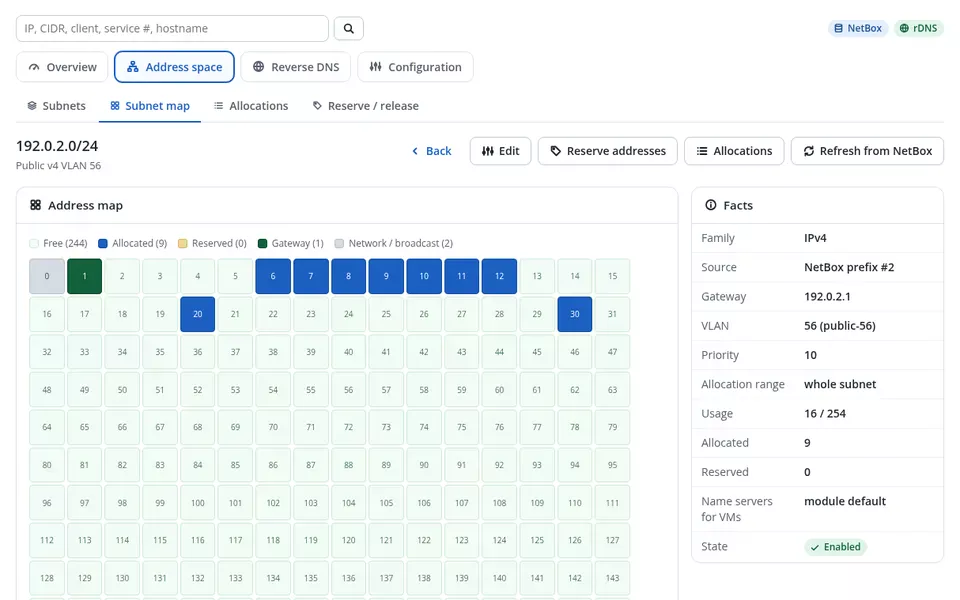
Each square is one address. Click one to see its details.
203.0.113.10
Allocated
203.0.113.1Allocations
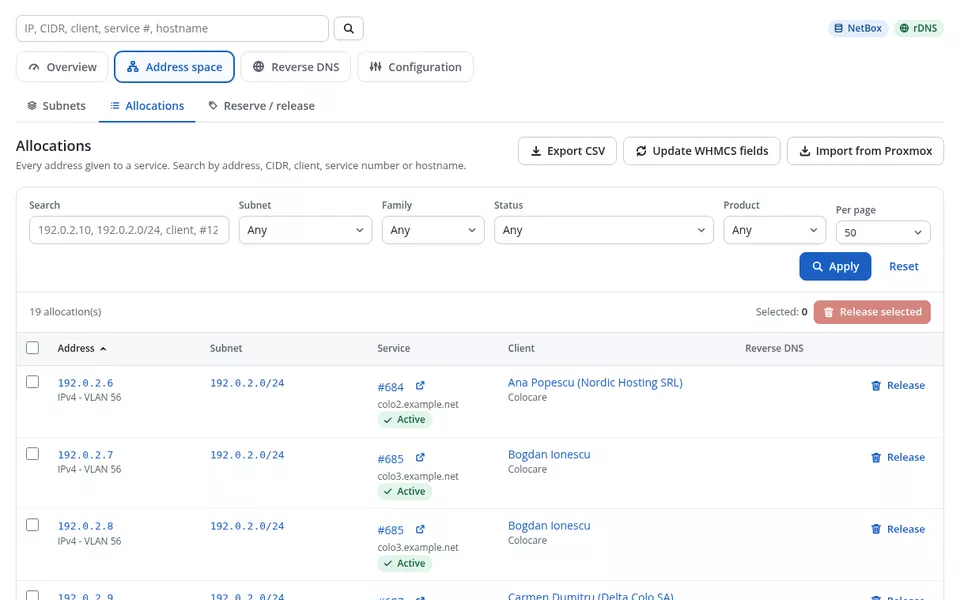
Every address held by a service, from WHMCS and the address store. Search by address, CIDR, client, service number or hostname.
| Address | Service | Client | Subnet | Since |
|---|---|---|---|---|
203.0.113.10 | #1482 web01.example.com - VPS Cloud 4 | Andrei Popescu | 203.0.113.0/24 | 17/11/2026 |
2001:db8:120::a | #1482 web01.example.com - VPS Cloud 4 | Andrei Popescu | 2001:db8:120::/64 | 17/11/2026 |
203.0.113.11 | #1479 shop.example.org - VPS Cloud 2 | Ioana Stan | 203.0.113.0/24 | 15/11/2026 |
203.0.113.12 | #1479 shop.example.org - VPS Cloud 2 | Ioana Stan | 203.0.113.0/24 | 15/11/2026 |
198.51.100.21 | #1466 db1.deltacolo.example - Dedicated E5 | Mihai Dobre (Delta Colo SA) | 198.51.100.0/25 | 09/11/2026 |
203.0.113.14 | #1460 mail.example.net - VPS Cloud 8 | Elena Marin | 203.0.113.0/24 | 05/11/2026 |
2001:db8:120::e | #1460 mail.example.net - VPS Cloud 8 | Elena Marin | 2001:db8:120::/64 | 05/11/2026 |
198.51.100.22 | #1451 rack12.example.com - Colocation 1U | Radu Constantin | 198.51.100.0/25 | 28/10/2026 |
Service #1482 Active
web01.example.com - VPS Cloud 4 - Andrei Popescu
| Address | Gateway | WHMCS | NetBox | Proxmox | PTR |
|---|---|---|---|---|---|
203.0.113.10IPv4 | 203.0.113.1 | OK | OK | OK | web01.example.com |
2001:db8:120::aIPv6 | 2001:db8:120::1 | OK | OK | OK | v6.web01.example.com |
Releasing gives the address back to its pool, removes its PTR record and updates NetBox and the service fields. Terminate and service delete do this automatically.
Reserve / release
Hold addresses that must never be handed out (routers, VRRP, infrastructure), or release several at once.
| Reserved address | Note | Since |
|---|---|---|
203.0.113.250 | core router, VRRP | 17/11/2026 |
203.0.113.2 - .5 | switches and PDU | 02/10/2026 |
Reverse DNS records
PTR records of the allocated addresses, read live from the DNS server for the page shown.
Limit: 10 changes per service per hour; 2 domains on the denylist (Settings).
Orphaned PTRs
PTR records in your reverse zones for addresses no service holds any more. Only registered subnets are scanned; nothing is deleted without your selection.
| Address | PTR | Last holder | |
|---|---|---|---|
203.0.113.37 | old-vps.example.org | #1398 (terminated) | |
203.0.113.200 | lab.example.net | never allocated |
rDNS log
Every PTR change by clients, admins and the module, with the old value so it can be restored.
| When | Who | Address | Old | New |
|---|---|---|---|---|
| 17/11/2026 11:58 | Elena Marin | 203.0.113.14 | - | mail.example.net |
| 17/11/2026 09:02 | Cron | 203.0.113.37 | old-vps.example.org | (removed on release) |
| 16/11/2026 16:44 | Admin | 203.0.113.10 | vps1482.example.net | web01.example.com |
| 16/11/2026 08:15 | Andrei Popescu | 2001:db8:120::a | - | v6.web01.example.com |
Backend & health
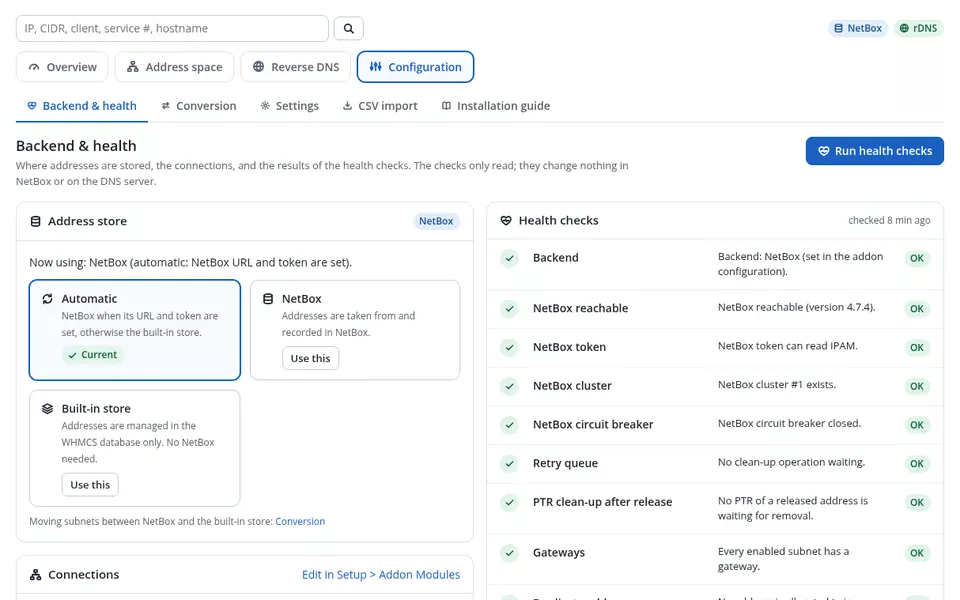
Where addresses are stored, the connections, and the results of the health checks. The checks only read; they change nothing in NetBox or on the DNS server.
Now using: NetBox (automatic: NetBox URL and token are set).
NetBox when its URL and token are set, otherwise the built-in store.
CurrentAddresses are taken from and recorded in NetBox.
CurrentAddresses are managed in the WHMCS database only. No NetBox needed.
CurrentMoving subnets between NetBox and the built-in store: Conversion
https://netbox.example.nethttps://ns1.example.net:8081Conversion wizard
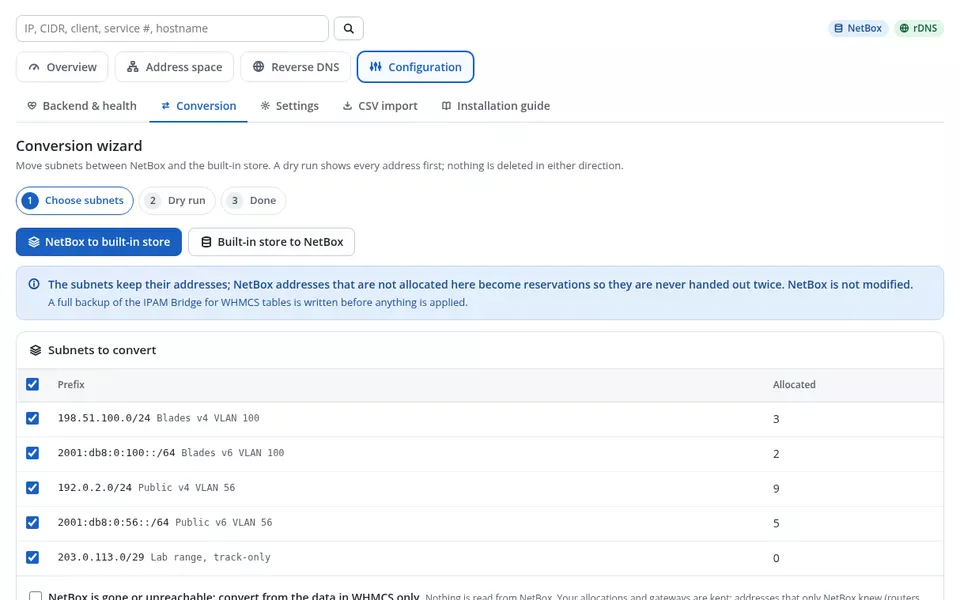
Move subnets between NetBox and the built-in store. A dry run shows every address first; nothing is deleted in either direction.
| Prefix | Allocated | |
|---|---|---|
203.0.113.0/24 | 112 | |
198.51.100.0/25 | 117 | |
2001:db8:120::/64 | 61 | |
2001:db8:140::/64 | 13 |
| Address | Action | Reason |
|---|---|---|
203.0.113.10 | keep allocation | #1482 web01.example.com |
203.0.113.2 | reserve | in NetBox, no service (switch-a) |
203.0.113.1 | gateway | description "gateway" |
4 subnets now live in the built-in store, 303 allocations kept, 14 reservations added. Backup: ipambridge-20261117-1305.json. Nothing was deleted in NetBox.
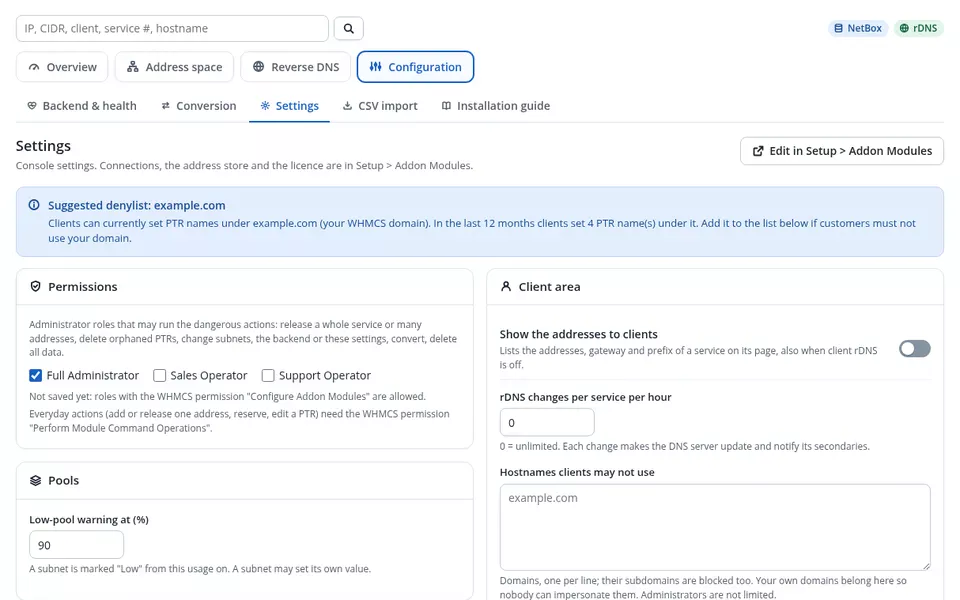
Settings
Console settings. Connections, the address store and the licence are in Setup > Addon Modules.
Administrator roles that may run the dangerous actions: release many addresses, delete orphaned PTRs, change subnets, the backend or these settings, convert, delete all data.
Deactivating the module keeps its data. To remove it for good, type DELETE: a backup is written first.
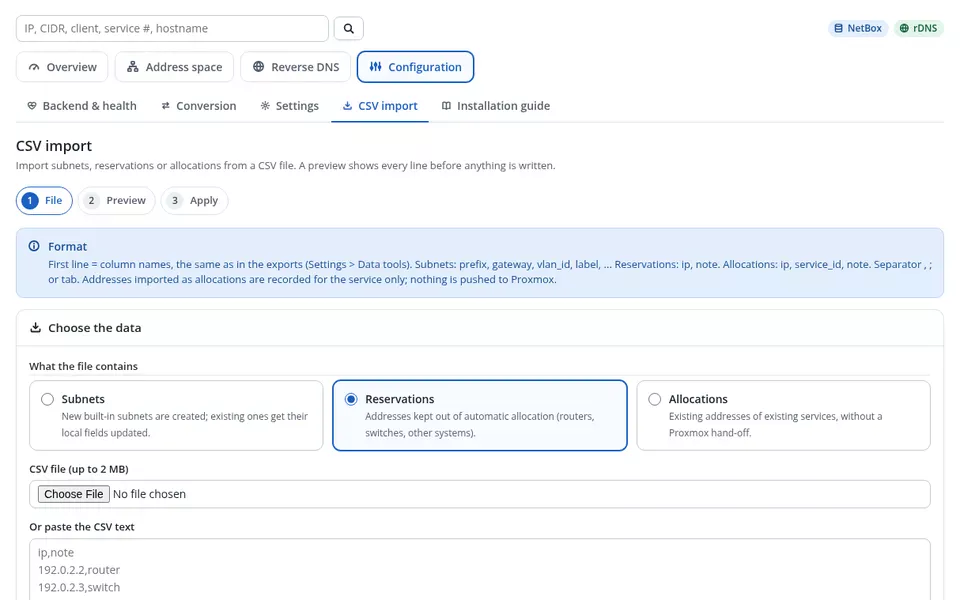
CSV import
Subnets, reservations and allocations from a CSV file, with a preview of every line before anything is saved. The first line holds the column names, the same as in the exports.
| Line | Item | Result | Reason |
|---|---|---|---|
| 2 | 192.0.2.0/26 | create | new subnet, gateway 192.0.2.1 |
| 3 | 192.0.2.10 #1501 | create | allocation recorded (not pushed to Proxmox) |
| 4 | 192.0.2.62 | create | reservation |
| 5 | 203.0.113.10 #1490 | conflict | already held by service #1482 |
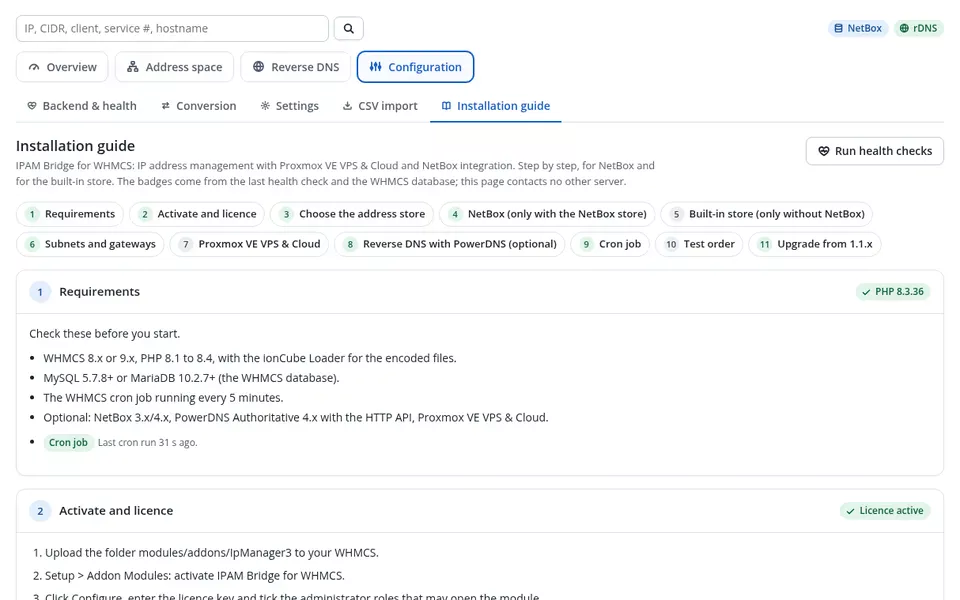
Installation guide
Step by step, for NetBox and for the built-in store. The badges come from the last health check and the WHMCS database; this page contacts no other server.
- WHMCS 8 or 9 - this installation: WHMCS 9.0.2
- PHP 8.3 with ionCube Loader 15 - package loader15
- WHMCS cron running every 5 minutes
- Optional: NetBox, PowerDNS Authoritative with the HTTP API, Proxmox VE VPS & Cloud
Upload modules/addons/IpManager3, activate IPAM Bridge for WHMCS under Setup > Addon Modules, paste the licence key and tick the roles that may open it. The tables are created automatically.
IPAM Bridge can keep the address plan in NetBox or in the WHMCS database. Everything else (Proxmox, reverse DNS, client area) works the same.
| NetBox | Built-in store | |
|---|---|---|
| Free addresses | asked from NetBox | worked out in WHMCS |
| Subnets | NetBox prefixes | typed in CIDR form |
| Best for | teams that already document the network in NetBox | everyone else: no extra software |
With "Automatic" (the default) NetBox is used as soon as its URL and token are filled in. Switching later is done with the conversion wizard, so no address is handed out twice.
Create an API token with view on prefixes, VLANs and clusters, and view, add, change, delete on IP addresses (virtual machines optional). Test it from the WHMCS server:
Not used here: this installation keeps addresses in NetBox. With the built-in store you add subnets directly in the console (Address space > Subnets > Add subnet); the gateway is suggested and never handed out.
- Enabled subnets of the right family, lowest priority first
- Restrictions to servers or products narrow the choice
- IPv6 pairing makes the IPv6 address follow the IPv4 one
IPAM Bridge answers the IP management integration of Proxmox VE VPS & Cloud For WHMCS: no change in the Proxmox module is needed. The number of addresses comes from the product or its configurable options; the subnet VLAN is passed to the VM interface; upgrades top up, downgrades are flagged.
Enable the HTTP API on the primary PowerDNS server, allow the WHMCS server, create the reverse zones, then fill in the API URL and key.
Last WHMCS cron 2 min ago. Every 5 minutes: NetBox retries, PTR clean-up of released addresses, VLAN and NetBox VM refresh.
- Order a product that uses IPAM Bridge and accept the order
- Address space > Allocations: the service has its addresses
- Log in as the client: addresses and rDNS appear on the service page
- Terminate the test service: the addresses return to the pool
Back up the tables, upload the new files over the old ones (same folder), open Setup > Addon Modules once and run the health checks. Every subnet, allocation, setting and the licence key are kept.
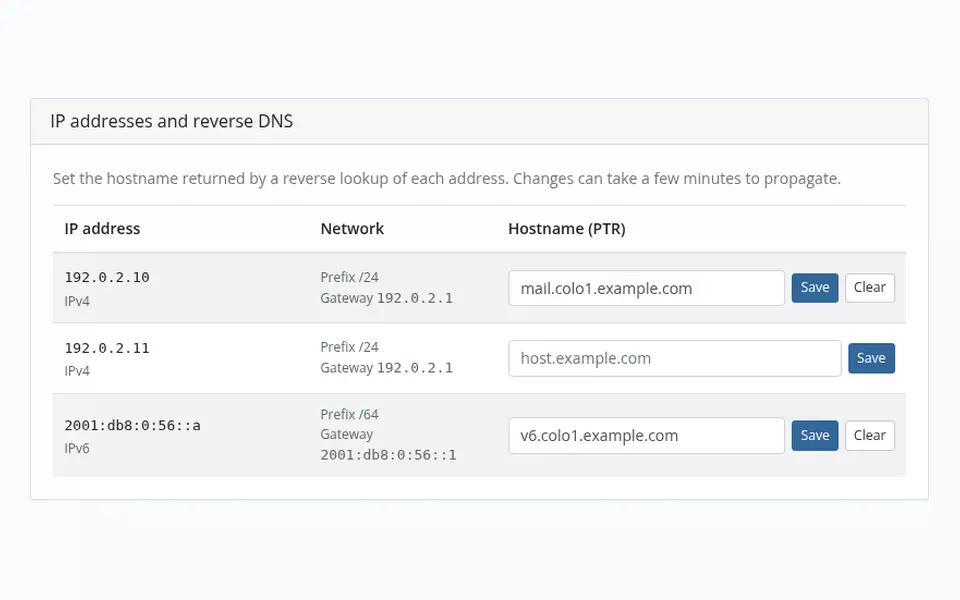
Reverse DNS on the service page
With PowerDNS connected, clients set the PTR record of each of their addresses, with the prefix and gateway shown next to it. Optional limits keep it safe. In English and Romanian.
VPS Cloud 4
IP addresses and reverse DNS
Set the hostname returned by a reverse lookup of each address. Changes can take a few minutes to propagate.
| IP address | Network | Hostname (PTR) |
|---|---|---|
203.0.113.10IPv4 | Prefix /24 Gateway 203.0.113.1 | Demo: saved. Changes can take a few minutes to propagate. |
203.0.113.11IPv4 | Prefix /24 Gateway 203.0.113.1 | Demo: saved. Changes can take a few minutes to propagate. |
2001:db8:120::aIPv6 | Prefix /64 Gateway 2001:db8:120::1 | Demo: saved. Changes can take a few minutes to propagate. |
Limit: 10 changes per hour for this service. Hostnames under domains you do not control may be refused.
See the real module
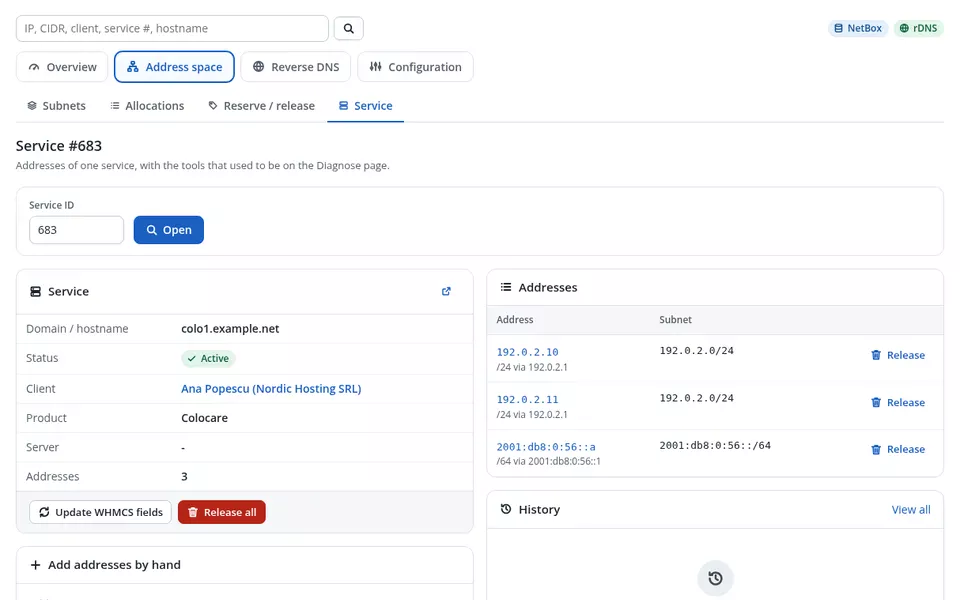
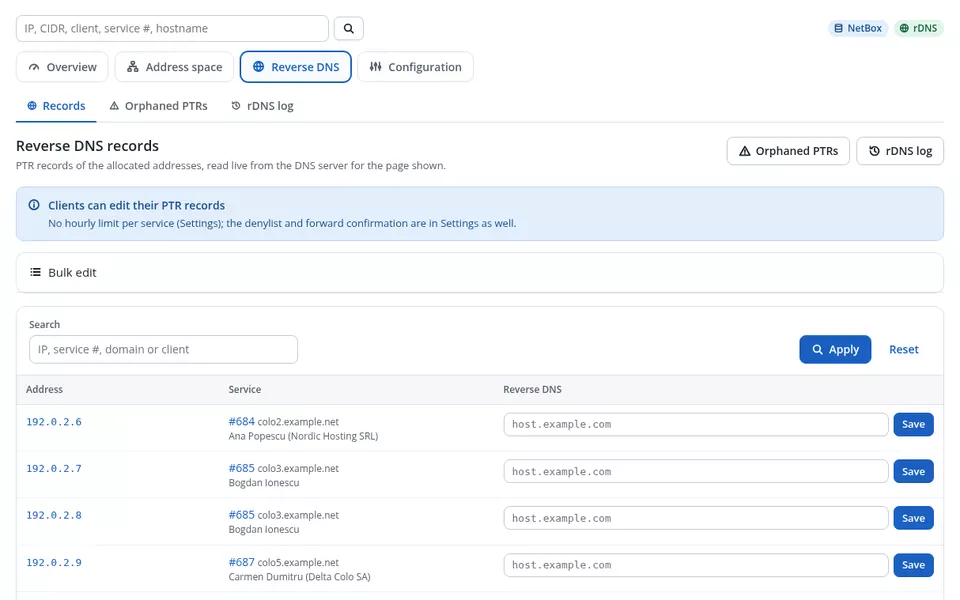
Version 1.1.3 on a test installation with demo services and documentation address ranges. Click any image to enlarge it.
What’s inside
One WHMCS addon that keeps the address plan, hands out addresses to services and keeps WHMCS, NetBox, Proxmox and your DNS in step.
IPv4 and IPv6 subnets
Gateway, VLAN, allocation range, exclusions, priority and product or server restrictions per subnet; track-only subnets for ranges you only document.
Automatic lifecycle
Addresses on service creation with top-up, release on terminate and service delete, extra addresses on upgrades; downgrades are only flagged, never released by themselves.
Reservations
Hold routers, VRRP and infrastructure addresses so they are never handed out, singly or as ranges.
Subnet map and search
Every address of a subnet at a glance, plus one search box for address, CIDR, client, service number or hostname.
History and CSV
Activity log for every address, CSV exports, a JSON backup and a CSV import with a line-by-line preview.
WHMCS fields in sync
The dedicated and assigned IP fields of each service follow the allocations, also for dedicated servers and colocation added by hand.
Built-in store
The address plan lives in the WHMCS database. No NetBox, no extra software: add subnets in CIDR form and start selling.
NetBox as source of truth
Addresses are taken from your NetBox prefixes and recorded there, with optional VM objects, interfaces and tags. Tested with NetBox 4.
Guided conversion
Move subnets between NetBox and the built-in store with a dry run; allocations are kept, NetBox-only addresses become reservations, nothing is deleted.
Read-only health checks
NetBox reachability, token rights, cluster, gateways, duplicates, Proxmox integration, VLAN tags, DNS server, cron and licence on one page.
Resilient when NetBox is down
Short timeouts, a circuit breaker and a retry queue: a slow NetBox never blocks your billing, and failed clean-ups are retried automatically.
Automatic choice
"Automatic" uses NetBox when its URL and token are set, otherwise the built-in store, so a new installation works out of the box.
No change to the Proxmox module
IPAM Bridge answers the IP management integration of ModulesGarden Proxmox VE VPS & Cloud For WHMCS (tested with 4.4.2): activate the addon and the Proxmox module asks it for addresses.
VPS and Cloud, KVM and LXC
IPv4 and IPv6 with gateway and the subnet VLAN tag passed to the VM interface; the number of addresses comes from the product or its configurable options.
Import existing services
Take over the addresses of services that already run in Proxmox, then compare WHMCS, the address plan and Proxmox per service.
Failures you can act on
A failed allocation creates a To-Do item and an admin e-mail, with a Retry button in the console.
Client self-service
Clients set the PTR records of their own addresses on the service page; admins manage every record from the console.
PowerDNS HTTP API
PowerDNS Authoritative Server 4.x on the primary; secondaries follow by zone transfer. Optional: without it, everything else works.
Anti-abuse
Change limit per service per hour, a denylist of domains clients may not use and an optional forward-confirmed rDNS check.
Clean-up on release
PTRs of released addresses are removed, retried if the DNS server was briefly down; orphaned PTRs can be found and removed by selection.
From upload to the first allocation in six steps
The full guide (INSTALL.txt) ships with the module and is in your client area. The console’s Installation guide checks each step for you.
modules/addons/IpManager3 from the package for your ionCube Loader, activate it under Addon Modules and paste your licence key.Changelog
Newest first. Updating is uploading the new files over the old ones; database changes are applied automatically.
v1.1.3 17 November 2026 Latest
- New New name: IPAM Bridge for WHMCS (same module, same licence key, same settings; an update over 1.1.x keeps everything).
- New Works without NetBox: choose NetBox or the built-in address store in WHMCS, with automatic detection and a guided conversion between the two that never loses an allocation (also possible when NetBox is gone).
- New Redesigned admin console: overview, health checks, search, subnet usage map, reservations, address history, CSV export and CSV import with a preview.
- New Installation guide inside the console with a live status for every step.
- New Extra IP addresses are added automatically when a client upgrades; a downgrade is flagged for the administrator, nothing is released.
- Improvement Failed allocations create a To-Do item and an admin e-mail with a "Retry" button in the console.
- Improvement Client reverse DNS: optional change limit per service and a list of domains clients may not use (both off after an update from 1.1.x).
- Improvement Reverse DNS of released addresses is removed even when the DNS server was briefly unavailable (retried automatically).
- Improvement Deactivating the addon keeps your data; deleting it is a separate, confirmed action.
- Security Security and reliability improvements. Updating is recommended.
v1.1.2 31 October 2026
- New The module page shows the installed version and, when a newer release is published, an "Update available" badge and a banner linking to your client area. Checked at most twice a day; never affects licensing or normal operation.
- Improvement Clearer update instructions: overwrite the files, no deactivation, database changes applied automatically.
v1.1.0 14 October 2026
- New NetBox-based IP address management for Proxmox VE VPS & Cloud For WHMCS: every address is allocated straight from your NetBox prefixes.
- New Fully automatic IP lifecycle: allocation on service creation with safe top-up, and automatic release on terminate or service delete.
- New Per-service diagnose tooling that cross-checks WHMCS, the addon and NetBox.
- New PowerDNS reverse-DNS self-service for clients, with an optional forward-confirmed rDNS check.
- Improvement Two builds: ionCube Loader 14 (PHP 8.1-8.3) and ionCube Loader 15 (PHP 8.1-8.4).
Will it run on your setup?
A standard WHMCS addon. NetBox, PowerDNS and the Proxmox module are all optional: use the parts you have.
- WHMCS
- WHMCS 8 (8.10 or newer) and WHMCS 9, with the cron running every 5 minutes
- PHP
8.1to8.4with the ionCube Loader: packageloader14for Loader 14 (PHP 8.1 - 8.3), packageloader15for Loader 15+ (PHP 8.1 - 8.4). The website and the cron must both use a covered PHP version- Address store
- Built-in (WHMCS database, nothing else needed) or, optionally, NetBox
4.x(3.x also supported) with an API token, HTTPS recommended - Reverse DNS
- Optional: PowerDNS Authoritative Server
4.xwith the HTTP API (api/v1) on the primary - Proxmox
- Optional: ModulesGarden Proxmox VE VPS & Cloud For WHMCS, tested with
4.4.2(sold separately by ModulesGarden). Without it, addresses are added from the console - Languages
- Admin console and client area in English and Romanian
- Licence
- Annual, one WHMCS installation per licence; existing services, releases and client rDNS keep working even when the licence lapses
Downloads, updates and your licence key in your client area
Open your IPAM Bridge for WHMCS service and a Downloads & Documentation panel gives you both packages (loader14 and loader15), the changelog, the installation guide and your licence key, for as long as your licence is active.
Every release, always
Download the package for your ionCube Loader straight from your service page. Per account, never a public link.
Free updates while active
Every new version is included for the whole licence term, and the console tells you when one is available.
One key, one installation
The same licence key activates the module inside WHMCS. Moving to a new server? Reissue it from your client area.
One annual licence
or 250 RON / year · $57 / year
- ✓ Standalone or with NetBox
- ✓ Unlimited subnets, addresses and services
- ✓ Proxmox VE VPS & Cloud integration and client rDNS
- ✓ Free updates for the licence term
- ✓ WHMCS 8 & 9, PHP 8.1 – 8.4
- ✓ Support by ticket
Proxmox is a registered trademark of Proxmox Server Solutions GmbH. NetBox is a trademark of NetBox Labs, Inc. PowerDNS is a trademark of PowerDNS.COM BV. ModulesGarden and Proxmox VE VPS & Cloud For WHMCS are trademarks of ModulesGarden; WHMCS is a trademark of WHMCS Limited. IPAM Bridge for WHMCS is an independent product by DreamServer, not affiliated with or endorsed by any of them. The Proxmox module is sold separately by ModulesGarden.
Frequently asked questions
Do I need NetBox?
No. IPAM Bridge works standalone with its built-in address store in the WHMCS database, or with NetBox as the source of truth. "Automatic" (the default) uses NetBox as soon as its URL and token are set, otherwise the built-in store.
How does it work with Proxmox VE VPS & Cloud?
It answers the IP management integration of the ModulesGarden Proxmox VE VPS & Cloud For WHMCS module (tested with 4.4.2) without modifying it. New VPS and Cloud services, KVM or LXC, get their IPv4 and IPv6 addresses, gateway and VLAN automatically; terminate releases them, upgrades add more. The Proxmox module is sold separately by ModulesGarden.
Can I use it for dedicated servers and colocation?
Yes. For products without the Proxmox module you add addresses from the service page of the console; they are tracked, kept in the WHMCS dedicated and assigned IP fields, shown in the client area and released when the service ends.
Can I move from NetBox to the built-in store, or back?
Yes, with the conversion wizard. It runs a dry run first, keeps every allocation and turns addresses that exist only in NetBox into reservations, so nothing is handed out twice. It also works when NetBox is already gone, from the data kept in WHMCS. Nothing is deleted in either direction.
Is PowerDNS required?
No, reverse DNS is optional. With a PowerDNS Authoritative Server 4.x and its HTTP API, clients set the PTR records of their own addresses from the service page, admins manage all records, and PTRs of released addresses are removed automatically. A per-service change limit, a denylist and an optional forward-confirmed check protect against abuse.
I run IP Manager 3 NetBox 1.1.x. Is the update safe?
Yes. IPAM Bridge for WHMCS is the same module under a new name: upload the files over the old ones without deactivating anything. Every subnet, allocation, setting and your licence key are kept, and NetBox stays the backend. The new client rDNS limit and denylist start switched off after the update.
Which package do I download?
There are two: loader14 for ionCube Loader 14 (PHP 8.1 to 8.3) and loader15 for ionCube Loader 15 or newer (PHP 8.1 to 8.4). Both the WHMCS website and the WHMCS cron must run a PHP version covered by the package you choose.
What if my licence expires?
Existing services keep working: releases on terminate, the cron, read views and client reverse DNS are never blocked. Only new allocations and admin changes in the console wait until the licence is renewed.