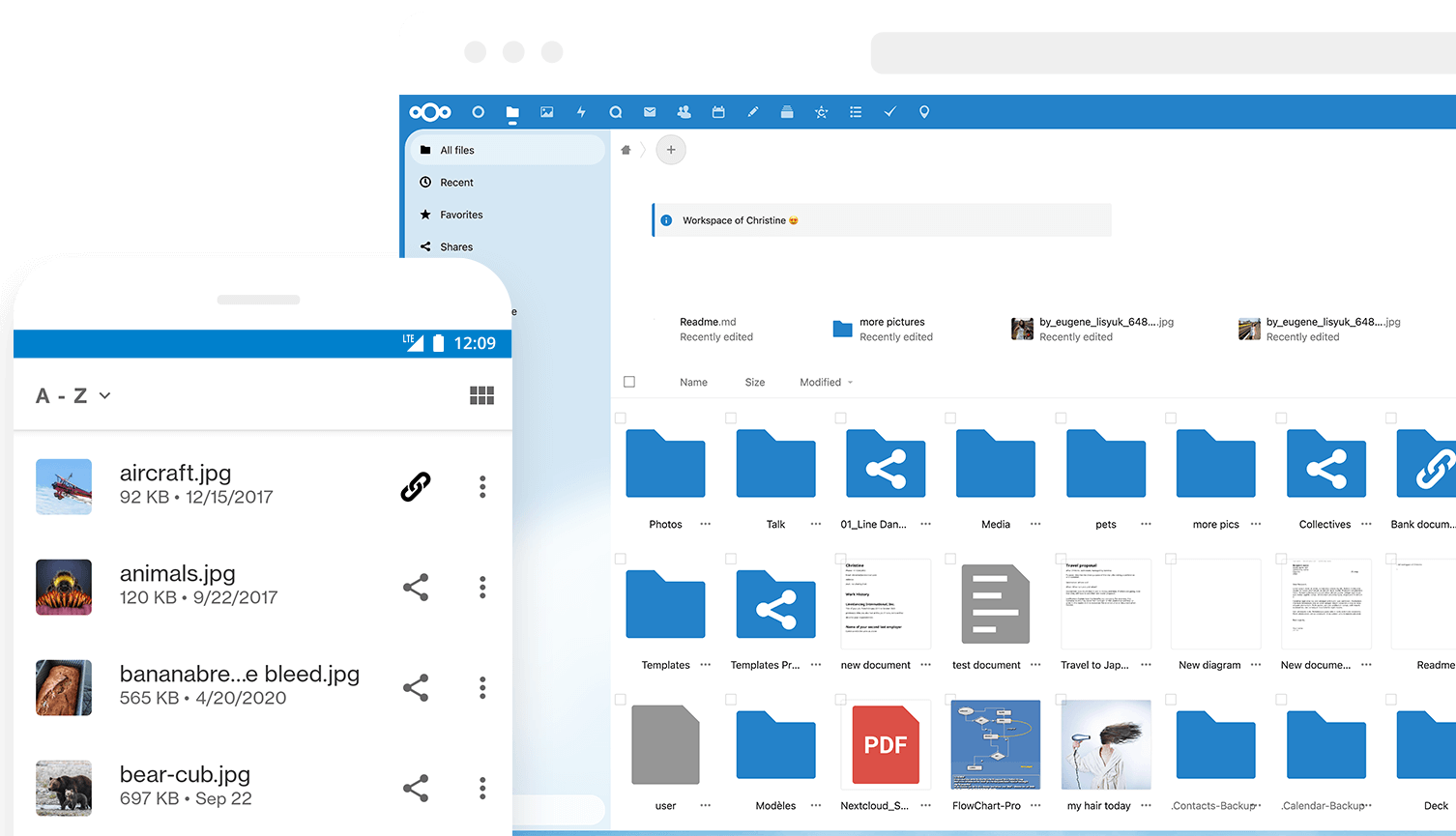
Nextcloud: Your Own Dropbox, Minus the Vendor Lock-in
There’s a specific moment every company hits eventually: someone asks exactly where the company’s files live, and nobody has a good answer. “Google Drive” isn’t an answer, it’s a black box. The files sit somewhere in a US-owned data center, subject to US law regardless of which EU region you picked in the settings, and the pricing tier you’re on today isn’t guaranteed to exist next year. Add a “storage full” nag at the worst possible time and the fact that you’re paying per seat for something as basic as a shared folder, and the appeal of just running your own becomes obvious.
That’s the itch Nextcloud scratches. It’s open source (AGPLv3), the code lives on GitHub , and at its core it’s a file sync and share platform you install on your own server, backed by your own database, on storage you control. We say this because we actually run it: DreamServer offers managed Nextcloud hosting out of our own Bucharest datacenter, meaning the data doesn’t transit through a third party’s infrastructure at all, it sits on our storage, behind our network, inside Romania. For companies with GDPR obligations, or public sector and healthcare clients who need to point at a specific physical location and say “that’s where it is,” that distinction matters, not as a compliance checkbox but as a real answer to a real question.
What Nextcloud actually is
Calling Nextcloud “a Dropbox clone” undersells it. Files is the core app: desktop clients for Windows/macOS/Linux, mobile apps for iOS/Android, and a web UI, keeping folders in sync in real time with the usual conflict handling and offline queueing. But Files is just the entry point into an app ecosystem that turns the same install into a fairly complete internal collaboration platform:
- Talk for chat, voice, and video calls (including group calls), useful if you want your team communicating on infrastructure you control rather than a SaaS chat tool.
- Calendar and Contacts, both speaking standard CalDAV/CardDAV, so they sync with Thunderbird, Apple Calendar, or any other standards-compliant client.
- Mail, a webmail client living inside the same interface, plus Deck, a Trello-style kanban board for lightweight project tracking.
- Notes, plus dozens more apps in the built-in app store covering everything from forms to whiteboards.
- Online document editing through integration with Collabora Online or OnlyOffice, both separate open source projects that plug into Nextcloud so you can co-edit a Word or Excel file in the browser without ever touching Microsoft 365.
On storage, Nextcloud isn’t limited to its own disk: you can mount S3-compatible object storage, FTP, SMB/CIFS shares, or other WebDAV servers as external storage, so it can sit in front of storage you already have rather than forcing a migration.
Why it matters
Strip away the app list and the actual pitch is data sovereignty. When you run Nextcloud yourself, or have someone run it for you, instead of handing files to Google Workspace or Microsoft 365, you know exactly which server, which datacenter, which country your data sits in. For a Romanian or EU company with GDPR obligations, that’s not a nice-to-have, it’s the difference between a straightforward compliance answer and a lengthy explanation involving Standard Contractual Clauses and a lawyer. It’s why we built this into our own service lineup: our Nextcloud storage hosting runs on infrastructure we own end to end, so the answer to “where’s the data” is “in our Bucharest datacenter,” full stop.
What you get out of the box
Once it’s running, day-to-day Nextcloud gives you a fairly complete replacement for the file-sharing habits most teams have picked up from consumer cloud tools, minus the seat-based pricing anxiety:
- Sync clients for desktop and mobile that keep local folders mirrored against the server, with selective sync so you’re not forced to mirror everything to every device.
- Share links with configurable expiry dates, optional passwords, and permission levels (view-only, upload-only, edit), so sending a client a file doesn’t mean emailing an attachment into the void.
- File versioning, so an overwritten or accidentally-deleted file has a history you can roll back to, plus Talk for video calls when you want a call link that doesn’t depend on a third-party account.
- CalDAV/CardDAV sync for calendars and contacts across every device and client that speaks those (very ordinary, very well-supported) protocols.
- Collaborative document editing in the browser through Collabora or OnlyOffice, with multiple people editing the same document simultaneously, plus external storage mounting for S3, FTP, SMB, and WebDAV backends.
- Two-factor authentication for logins, and an activity/audit log so you can see who touched what and when, which matters the moment you need to answer “who deleted this file” honestly.
Installing Nextcloud on a VPS
The deployment path Nextcloud itself recommends today is Nextcloud All-in-One (AIO), a Docker-based setup where a single mastercontainer manages Nextcloud, the database, Collabora, and the other moving parts together, and gives you a web UI to configure the rest. It’s a meaningful improvement over hand-rolling a LEMP stack with a dozen PHP extensions, because AIO handles updates and the interdependencies between components for you.
On a fresh VPS with Docker installed, the mastercontainer starts like this:
sudo docker run \
  --init \
  --sig-proxy=false \
  --name nextcloud-aio-mastercontainer \
  --restart always \
  --publish 8080:8080 \
  --env APACHE_PORT=11000 \
  --env APACHE_IP_BINDING=127.0.0.1 \
  --volume nextcloud_aio_mastercontainer:/mnt/docker-aio-config \
  --volume /var/run/docker.sock:/var/run/docker.sock:ro \
  nextcloud/all-in-one:latest
That exposes the AIO web interface on port 8080, where you set an admin passphrase and get walked through pulling and starting the Nextcloud, database, and Collabora containers. From there you point a reverse proxy (or AIO’s own built-in one) at it for the real domain and TLS certificate.
Firewall-wise, the rule of thumb is: expose only what needs to be public, and close the setup port once configuration is finished.
ufw allow 443/tcp        # HTTPS, the actual Nextcloud interface
ufw allow 8080/tcp       # AIO setup UI, restrict to your IP or close after setup
ufw deny 11000/tcp       # internal Apache port, never expose this directly
ufw enable
This is a workload that fits comfortably on a mid-tier DreamServer VPS : the mastercontainer, database, and Collabora together aren’t heavy for a small team, though you’ll want to size RAM up if you’re running Collabora for a lot of simultaneous document editors.
Configuration patterns worth knowing
Collabora vs OnlyOffice
Both plug into Nextcloud as separate services and let you co-edit Office documents in the browser. Collabora (LibreOffice’s rendering engine) tends to have better fidelity for complex ODF/OOXML formatting and is what AIO bundles by default. OnlyOffice’s UI more closely mimics Microsoft Office, and some teams find that transition easier. Neither is objectively “better,” it’s fidelity versus familiarity, and both run as their own containers alongside Nextcloud.
External storage as primary storage
For larger deployments, mounting S3-compatible object storage as the primary storage backend, rather than local disk, is a common pattern: it decouples storage growth from the VM’s disk and lets you scale storage independently of compute. This is configured per-storage in the External Storage app rather than as a wholesale replacement, so you can mix local and object storage across different folders.
Server-side encryption vs E2EE
Server-side encryption-at-rest encrypts files on disk so raw disk access doesn’t expose plaintext, useful against physical theft, but the server itself still holds the keys and can decrypt on the fly. The separate End-to-End Encryption app is stricter: specific folders where even the server operator can’t read contents, at the cost of losing features like full-text search on those folders. Default to server-side encryption and reach for E2EE only where it’s genuinely needed.
Redis for locking and caching
Nextcloud uses file locking to prevent two clients from corrupting the same file during simultaneous edits, and by default that locking, along with general caching, can fall back to slower mechanisms. Wiring in Redis for both is a well-documented performance win once you have more than a handful of concurrent users, and it’s included in the AIO stack by default.
Backing up the AIO stack
Because AIO manages its containers and volumes as a unit, backup strategy needs to account for the mastercontainer’s own backup tooling, accessible through its UI, rather than snapshotting individual containers ad hoc. Treat the whole stack, database included, as one consistent backup unit, and test a restore before you need one for real.
Where Nextcloud is not the right answer
Nextcloud is not a good fit for every case. If you’re two people who just want a shared folder that syncs, running a full server stack (web server, database, Redis, possibly Collabora) is real overhead for a problem a hosted consumer product solves with an app install and no server to think about. The AIO stack, while simpler than manual setup, is still multiple containers you’re responsible for patching and backing up, an ongoing cost, not a one-time task.
At the other end, thousands of concurrent editors and deep integration with an existing enterprise identity stack may need tooling depth a self-managed install doesn’t match out of the box (Nextcloud sells enterprise support for exactly this reason). And because the core is PHP, tuning it for very large user counts, PHP-FPM pool sizing, opcache, query performance, is its own discipline that gets fiddly without someone who’s done it before.
Alternatives we considered
- Seafile : a leaner, more narrowly-focused file sync and share tool. If all you need is fast, reliable file sync without the wider app ecosystem, Seafile’s smaller footprint is worth a look, though you give up Talk, Deck, and the built-in office suite integration.
- ownCloud : the project Nextcloud forked from in 2016. Development has diverged since, and Nextcloud has pulled ahead in app ecosystem breadth and release cadence, but ownCloud remains a legitimate, actively developed alternative if it fit your needs previously.
- Google Workspace / Microsoft 365: the honest non-self-hosted comparison. Both are more convenient out of the box, someone else handles the operations, and neither requires you to think about servers. The tradeoff is the one we opened with: your data sits on infrastructure you don’t control, in jurisdictions you don’t choose, at a per-seat price that can and does change.
So, should you run it?
If data residency, GDPR, or just not wanting to pay per-seat forever is a real concern for your organization, Nextcloud is a solid, mature answer, not a compromise. The AIO deployment path has made it considerably easier to stand up, and the app ecosystem means you’re likely replacing more than one SaaS subscription with a single self-hosted stack.
If you’d rather not run the stack yourself, that’s exactly what our Nextcloud storage hosting is for: managed Nextcloud on our own infrastructure in Bucharest, data residency handled, updates handled. If you want to run it yourself but on infrastructure that doesn’t disappear at the whim of a hyperscaler’s pricing team, a DreamServer VPS is a straightforward place to put the AIO stack, and if you’d rather hand off the ongoing patching without giving up control, our server administration service covers that gap.