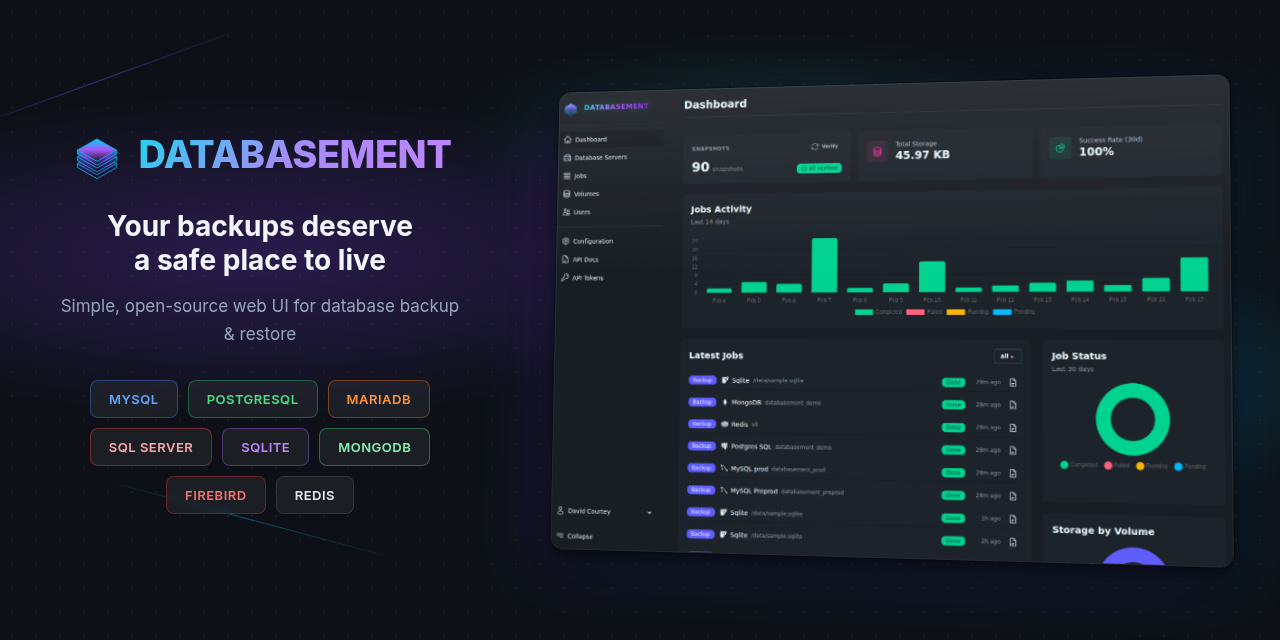
Databasement: self-hosted database backups, with schedules and restore
There is a lesson every administrator learns exactly once, and usually the hard way: a virtual machine snapshot is not a database backup. You restore the VM, the database starts from an inconsistent state in the middle of a transaction, and you discover that “we had a backup” does not mean “I can recover the data”. A proper database backup is a logical, consistent dump taken by the database engine itself, kept somewhere off-site, and tested so you know how to restore it. The problem is that doing this for ten databases across five servers, with schedules and retention, quickly turns into a swamp of cron scripts nobody understands anymore.
Databasement , the open-source database backup manager written by David Courty , solves exactly that swamp with a single web interface. It is licensed under MIT, has more than 1,800 stars on GitHub, and we run it self-hosted in our Bucharest datacenter. This post is the field report.
What Databasement actually is
Databasement is a centralized backup manager for databases. Instead of cron scripts scattered across every server, you have a single web application where you define the database servers, say what to back up and how often, where the backups should go and how long to keep them, and the application handles the rest: it runs the dumps on schedule, compresses them, uploads them to the chosen storage, and gives you a restore button when you need it.
Its tagline, “your backups deserve a safe place to live”, is not just marketing. The core idea is that a backup is a flow, not a file: it is taken, moved off-site, kept according to a policy, and must be restorable. Databasement models exactly this flow, with visibility on every step.
Which databases and destinations it covers
This is where Databasement is surprisingly complete for an open-source project. Out of the box it supports:
- Databases: MySQL, MariaDB, PostgreSQL, Microsoft SQL Server, MongoDB, SQLite, Firebird and Redis/Valkey. Basically anything you might run.
- Storage destinations: local, S3-compatible (AWS, MinIO, Backblaze), Azure Blob, Samba/SMB, SFTP and FTP. A backup that stays on the same server is not a backup, and Databasement makes off-site destinations easy.
- Compression and encryption: gzip, zstd, or AES-256 for encrypted backups.
- SSH tunnels and remote agents: to reach databases behind a bastion or in a private network, without exposing the database port.
- Notifications: email, Slack, Discord, Telegram, Pushover, Gotify and webhooks, so you find out immediately when a backup fails.
On top of all that, it has access control with SSO (Google, GitHub, GitLab, OpenID Connect), 2FA and role-based permissions, plus a REST API and even an MCP server for automation. It is far more than “a cron with a UI”.
Installing Databasement
Databasement is a Laravel application packaged neatly into a single container. The simplest variant gets you running with SQLite as the internal configuration store, so you do not need a separate database just to run the backup manager:
docker run -d --name databasement -p 2226:2226 \
  -e DB_CONNECTION=sqlite \
  -e DB_DATABASE=/data/database.sqlite \
  -e ENABLE_QUEUE_WORKER=true \
  -e PUID=1000 -e PGID=1000 \
  -v ./databasement-data:/data \
  davidcrty/databasement:1
You bring the container up, open the UI on port 2226, create your admin account on first access, and from there add the database servers and backup jobs from the interface.
One detail that matters a lot and deserves underlining: ENABLE_QUEUE_WORKER=true is not optional if you want scheduled backups. Databasement runs its scheduler in the same process as the queue worker. Without this flag, the app starts, the UI works, but scheduled jobs never fire, because there is nobody to execute them. It is the classic trap you fall into if you follow a minimalist compose. We run it exactly in this mode, single-container with the worker on, precisely so the scheduler is alive.
As with any tool that holds credentials to all your databases, do not expose it publicly without authentication. It has native login, but we also keep it behind our SSO, because an application that can perform destructive restores on production deserves a double fence. At minimum, restrict it with a firewall and put a reverse proxy with TLS in front.
If you are running this on a DreamServer VPS , remember that the backups themselves must land in off-site storage (S3, another server), not on the same disk, otherwise a single incident takes the database and the backup with it.
Configuration patterns worth knowing
A few things useful beyond the defaults.
The backup must leave the server
The golden rule: a backup on the same disk as the database does not save you from a disk failure or ransomware. Configure an off-site destination (S3, SFTP to another server, SMB) from day one. Databasement makes this part of the job definition, use it.
Test the restore, not just the backup
A backup you have never restored is a theory, not a safety net. Use Databasement’s cross-server restore to periodically restore a backup into a test database and confirm the data is there. The day you need a restore is not the day you want to discover the dump was corrupt.
Tiered retention
Do not keep everything forever, but do not keep only the last copy either. A healthy policy is a few dailies, a few weeklies, a few monthlies. Databasement supports per-job retention policies, exactly so you do not fill your storage while still having historical depth.
SSH tunnels for private databases
Never expose port 3306 or 5432 to the internet just so the backup tool can reach it. Databasement connects through an SSH tunnel or a remote agent, so the database stays in its private network and the backup still reaches it.
Where Databasement is not the right answer
It is worth being honest about the limits.
- Not file or whole-machine backup. Databasement takes database dumps. For files, volumes or VM images you need a different tool (a Proxmox Backup , restic, borg). The two complement each other.
- Not a replacement for replication. A daily backup gives you a recovery point from yesterday, not real-time failover. For availability you need replication or a cluster; the backup is the safety net, not HA.
- The restore is your responsibility to test. The tool gives you the button, but the confidence only comes from pressing it periodically on real data.
- It is another stateful service to maintain. It has its own SQLite database, its own credentials, its own UI to patch. Worth it, but you treat it as infrastructure, with a backup of its own configuration.
Alternatives we considered
For completeness: we also looked at classic mysqldump/pg_dump scripts plus cron (they work, they are free, but they quickly become a swamp with no visibility, notifications or easy restore), at Bacula
and Bareos (very capable enterprise backup systems, but heavy and file-centric rather than database-centric), and at cloud-native solutions (RDS snapshots and the like, excellent if you are already there, useless self-hosted). For “I want a single place where I see and schedule the backups of all my databases, with one-click restore”, Databasement is the most on-target.
So, should you run it?
If you manage more than one database and your current backup is a cron script you have not checked in months, Databasement is worth the afternoon of setup. The first time you see in the dashboard all your databases with the last backup green next to each, with schedules and retention and off-site storage, and you know you can restore any of them with one click, you will understand the difference between “I hope I have a backup” and “I know I can recover”.
We run Databasement single-container, with the worker on so the scheduler is alive, behind our SSO, for our infrastructure’s databases. If you want to try it on infrastructure you do not have to build first, our VPS plans are perfect for a small backup manager, and our server administration service covers the install, the storage destinations and restore testing if you would rather skip the learning curve.
Either way, getting your database backups in order is the cheapest insurance in IT. The code is on GitHub, there is a public demo you can touch right now, and you will know within an hour whether it earns a spot in your infrastructure.